
You need to be strategic when choosing the best displays for your boat because your needs will heavily influence the display and other tools you use on your boats and yachts. Almost every ship or boat requires one or more marine displays, from ships to towboats, yachts, dredging equipment, cruise liners, rowboats, and commercial fishing boats.
There are numerous options to choose from when purchasing displays for your boats and yachts, because, as mentioned above, there is no one-size-fits-all for every boat or yacht.
What Is a Marine Display?
The navigation system screen, controls, information, and entertainment are all displayed on marine displays. They also improve visibility of many other systems on your boat, including navigation data, chart charting, radar, sounder, and sonar systems. Displays can also be used for dockside entertainment, web surfing, and movie screenings to keep guests and children entertained.
However, unlike other outdoor LCDs, outdoor LCD monitors used on marine vessels have various problems, such as the ability to read in bright sunlight, corrosive saltwater and air, and shock/vibration.
Say “No” to Regular Computer Monitors
The marine environment is harsh, wet, and sunny, with a high level of shock and vibration. Marine monitors are designed to thrive in this environment, but the extensive design process is required and makes them expensive.
Using the best marine display is one of the best investments when using a boat or yacht. Marine monitors can be costly, but they are worth the money you save when your regular computer monitor gets washed out in the sun or is killed by moisture on a rainy afternoon. Many boats and yacht owners mistakenly believe they can get by with regular computer monitors rather than investing in quality marine monitors that will save them the hassle of having to replace them whenever they get damaged.
Important Features to Consider in Boats or Yacht Displays
When purchasing a yacht display for your boats, there are essential things to consider, such as whether the display has a multifunctional display or not and its readability in the sun, among other things.
Typically, marine displays are only used for navigation. If you want a multifunctional display (MFD), you should buy one with the particular functionality you need.
1. Indoor and Outdoor Use:
LCDs designed for outdoor use can withstand the harshest weather conditions. They are sunlight readable, highly versatile, and have a high brightness capability to combat all levels of natural and artificial lighting. Indoor displays, on the other hand, simply do not have the same brightness capabilities as outdoor displays.
2. Sunlight Readability:
Sunlight readability refers to how well you can read a display in bright light, such as direct sunlight. The use of optically bonded glass can increase sunlight readability by up to 400%. Boats and yacht displays made of optically bonded glass can effectively reduce glares, reflections, and washed-out screens, enabling visibility in daylight.
3. Night Vision (NVIS) Compatibility:
Check if your display is compatible with night vision goggles and has LED backlights.
4. Touchscreen Monitors:
The touchscreen is not a part of the display but is attached as a separate layer. Touchscreens absorb some of the display’s brightness. Capacitive is more sensitive but less effective when wet and does not function at all while wearing gloves. Resistive can be used with gloves and withstand some water on top, but it requires more pressure and is less accurate.
5. IP Rating:
The mechanical and electrical enclosures’ level of protection against infiltration, dust, accidental contact, and water is categorized and outlined by the IP code, which also serves as a general guideline to consumers. Make sure that your display is durable and weatherproof. Marine environments can damage electronics, so get a display that can survive harsh weather.
6. Screen Size:
The bigger the display on a boat or yacht, the better the experience because it allows you to see more information, such as the chart plotter, radar, or fish finder.
Regardless of whether you mount your devices flush or on brackets, try to install the most significant screen(s) you can get on your boat or yacht. Cutting corners on displays is an unwise form of saving money, and boat/yacht owners and captains are learning to avoid it.
Nauticomp’s Marine Displays for Boats and Yachts
The following are the available marine displays for boats and yachts at Nauticomp.
Glass Bridge Elite
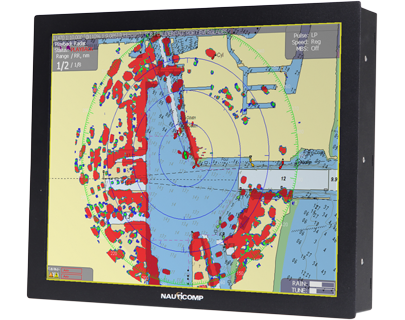
The following are the unique features of Glass Bridge Elite. You can read more about our Glass Bridge Elite here.
- High brightness, deep dimming
- Quick access, membrane under-glass controls
- Optically bonded, glare resistant, multi-touch glass
- Marine compliance, ABS, IEC60945, IEC 61174, & IEC 62388
- Easily remote controllable/integrate control into your on-board system
[button link=”https://nauticomp.com/outdoor-marine-displays/glass-bridge-elite/” size=”large” target=”_blank” color=”orange”]Learn More[/button]
Signature II Series
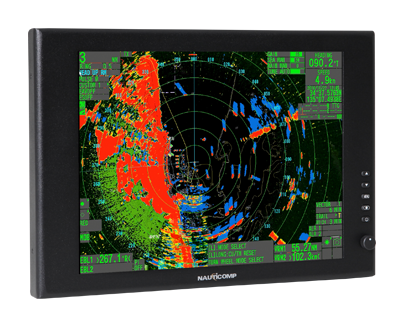
The Signature series has been updated with the following unique features:
- Sunlight readable and ready for all environments
- Waterproof and built to stringent IP 67 standards
- Bonded glass optically enhanced for clarity
- Multiple Inputs, including DVI, VGA, NTSC, PAL, SEC AM
- Deep Dimming from 0 to 100% via “Potentiometer.â€
- Superior Image and scalable resolution up to SXGA
- LED Backlighting that reduces power draw at all levels
- Extended temperature range on 15†models
- Picture in picture, designed to display ALL inputs
[button link=”https://nauticomp.com/outdoor-marine-displays/signature-ii-series-displays/” size=”large” target=”_blank” color=”orange”]Learn More[/button]
Genesis Series
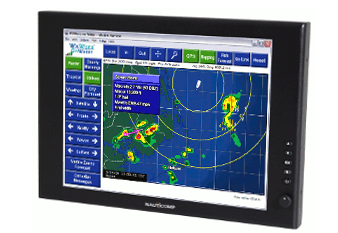
The Genesis series has the following unique features. Check here to learn more about Genesis series.
- Sunlight readable and ready for all environments
- Waterproof and built to stringent IP 67 standards
- Bonded glass optically enhanced for clarity
- Multiple Inputs, including DVI and VGA
- Deep Dimming from 0 to 100% via “Potentiometer.â€
- Superior Image and scalable resolution up to SXGA
- LED Backlighting that reduces power draw at all levels
- Extended temperature range on 15†models
[button link=”https://nauticomp.com/outdoor-marine-displays/genesis-series-displays/” size=”large” target=”_blank” color=”orange”]Learn More[/button]
Contact Nauticomp to Learn More About Our Rugged Marine Displays
Nauticomp Inc. is known for designing, manufacturing, and selling high-end marine displays. We have been in operation for over 25 years, so rest assured you will get the best solution that caters to your needs. Contact us today to learn more about our products.