How to Prevent or Repair LCD Display Screen Burn-In

Posted on: November 23, 2022

Ever notice a partial discoloration of text or image across the screen of your monitor? This can be annoying, especially when the monitor is an industrial display used to help your business.

These unpleasant discolorations are known as screen burn-in. In this blog post, we will discuss how to prevent and recover from LCD monitor screen burn-in.

What Is LCD Display Burn-in?

LCD display burn-in, also known as ghost image or image sticking, is the retention of the previous image on the screen even after you’ve swiped the screen. LCD burn-in happens on an LCD screen when pixels cannot return to their relaxed condition after a static image shows on the screen for an extended period.

Differences between Image Retention and LCD Burn-In

Technically, these are two different things. Image retention occurs when your display swiftly shifts from one image to another. For example, image retention occurs when you briefly notice the “shadow” of the first image in the second.

LCD monitor screen burn-in is the permanent version of image retention. Screen burn-in occurs when an image is shown on a screen for so long that it may still be seen after the screen is off. LCD burn-in happens when some sub-pixels have remained so brilliant for a very long time that they are unable to go back to their initial state. They always produce a “ghost” image because they are inherently “stuck” in a non-neutral state.

What Causes Image Persistence in LCD Monitors?

When pixels stay in the same place for an excessively long time before switching to another position for a brief period, this can lead to LCD monitor burn-in. In addition, when an image is displayed on a screen excessively, the liquid crystal material in the LCD panel becomes polarized. As a result, it develops into a permanent discoloration known as LCD display burn-in.

Can you Prevent or Repair Screen Burn-in in LCD Monitors?

Image persistence on LCD screens is avoidable and can be corrected. There are several ways to prevent or repair screen burn-in in LCD monitors, which include the following:

Screen Burn-In Prevention

  • Use a rotating screensaver that moves images to prevent leaving any area of the screen light for too long
  • When not in use, turn off the monitor
  • It’s best to change the background frequently to prevent picture persistence
  • Set your display to turn off after a few minutes of inactivity. This way, you can avoid images appearing on your screen for too long.

Screen Burn-in Recovery/Repair

  • Turn off the display for a few hours
  • Use a rotating image screensaver and leave it running for a while
  • Use a white screensaver for an extended period, forcing the crystals to reset at a single-color setting.

Contact Us to Learn More About Our Industrial LCD Displays

Nauticomp Inc. is dedicated to providing superior customer service through product innovation, quality, and customer support. Our entire line of high-performance rugged displays is at the forefront of leading-edge display technology.

With Nauticomp Inc., we will solve all your LCD display problems! Contact us today to learn more about our industrial LCD displays.

How Can You Enhance Defense Mission Performance with Rugged Military LCD Displays?

Posted on: November 16, 2022

When it comes to the military, lives are always on the line. The greatest intelligence and equipment are required for diverse military teams to succeed on a specific mission. And it’s no longer an assumption that military men are expected to be rugged at all times—day and night. Therefore, they need rugged devices to help them perform their duty. One of these devices is the rugged military LCD display.

A rugged LCD display can operate in any weather condition you might think of, be it heavy rainfall, intense brightness and darkness, shocks, and vibration. With a rugged LCD display, you will have a high-resolution image and clear night vision to enhance a timely, completed, and safe mission. If you are a military personnel, sit back as we journey into how you can enhance your defense mission performance in this post.

Why Do Military and Defense Personnel Choose Rugged Displays over Regular Monitors?

  • Rugged LCD Displays are built to withstand the worst conditions so that you can rely on them in extremely cold temperatures, moisture, and dark and light environments. They always function to the highest standards in any project.
  • It is the most durable technology created to fulfill your requirements.
  • Rugged military LCD displays are designed to fulfill all military specifications.
  • Our entire line of high-performance rugged displays is at the forefront of leading-edge display technology.

Defense Rugged Displays Checklist

Here are some important elements you need to look out for in a rugged defense display.                                                                 

LED Backlights

In daytime lighting settings, an LED backlight offers improved illumination that ensures perfect visibility and balances intense illumination. Backlights are used in low light conditions to help increase readability. The LED monitor uses light-emitting diodes for the backlight. An LED backlight is very important because it affects the quality of an image.

PCAP Touchscreen

Projected Capacitive Touchscreen (PCAP) is an advanced touchscreen with specialized coatings and films for increased optical performance, making them ideal for industrial or commercial applications. The use of PCAP, the newest touch sensor technology, has improved and aided in the evolution of devices. It has a touchscreen with a high resolution, quick response time, and an intuitive interface.

NVIS Support (Night Vision Imaging System)

NVIS is designed to enhance safe night missions. Every display used by the military has to be visible and dependable at night. NVIS is required for use in military applications. When interpreting light into objects that are far away and that you normally can’t see with your eyes alone, you can rely on NVIS.

Must Comply with MIL-STD (Defense Standard)

Military Standard (MIL-STD) is a set of environmental tests performed on rugged military materials under various harsh climatic and dynamic circumstances, including intense heat and cold. This is to ensure every military product meets the requirements for being field-ready.

Defense LCD Display Certifications and Requirements

Our military displays meet every requirement that makes them fit for field use such as:

IEC609945 Standards

Our defense monitors are made in accordance with IEC609945 standards, which means that they adhere to the International Electrotechnical Commission’s requirements for electrical, labelling, performance, and test procedures for electrical and electronic devices.

IP67/68 Rating

Our displays meet the IP rating, indicating that all our products satisfy waterproofness, dust, and water resistance requirements. This standard is established by the Ingress Protection Code (IP Code) IEC standard 60529. Each finished product is put through testing to see if the material is resistant to moisture and other raw materials like sand and dust before it can be approved for use. 

MIL-STD 810

Every rugged display goes through the MIL-STD which is majorly designed for the military. The U.S Department of Defense employs MIL-STD810 to achieve its predetermined goals. This is done to make sure that every product complies with the standards necessary to qualify as a military-grade.

Nauticomp’s Rugged LCD Displays Designed for Defense Operations

At Nauticomp, we carry the following military-grade displays.

Rugged Military-Grade Hammer Display
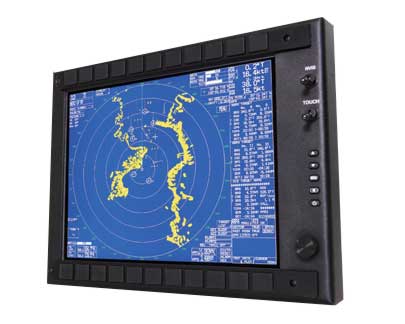
hammer series Display

The most durable military-grade LCD is the hammer display, as it can deliver great performance under adverse environments. For today’s military, missions are made easy by the Night Vision Imaging System (NVIS), which has multiple backlighting settings. It is a rugged technology with features like waterproofness and sunlight readability that provide image clarity, high shock resistance, touchscreens, and military-grade NVIS. It also has the ability to accommodate multiple display sizes and can be entirely dimmed to black. This military-grade Hammer Display comes with a three-year warranty.

[button link=”https://nauticomp.com/commercial-displays/hammer-nvis-displays/” size=”large” target=”_blank” color=”orange”]Learn More[/button]

Genesis Display Series
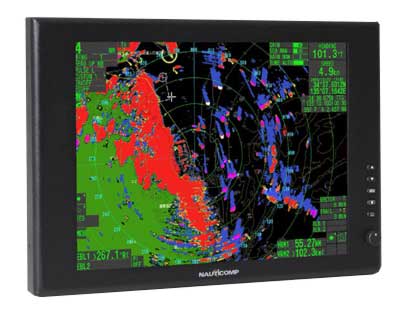
Genesis Series

The Genesis Display series comes with highly efficient LED Backlight Technology, 1 DV1 & 1 VGA. It provides a rugged and economical solution for both marine and military applications. It is sunlight readable for all environments, waterproofed, and has an extended temperature range on the 15” model. Deep dimming is guaranteed from -0 to 100% via a potentiometer.

[button link=”https://nauticomp.com/outdoor-marine-displays/genesis-series-displays/” size=”large” target=”_blank” color=”orange”]Learn More[/button]

Centric GB Displays
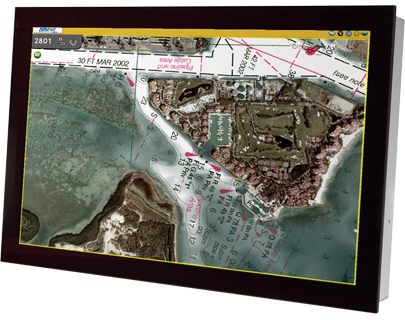
Centric GB Displays

The Centric Glass Bridge (GB) is designed by high-tech captains for rugged usage. It has the look and feel of an authentic glass bridge, meeting the demands of commercial and recreational vessels alike. It is also functional with multiple inputs, including DVI, VGA, NTSC/PAL, and S-Video. It features a compact remote that allows up to five monitors to be controlled from a single keypad.

[button link=”https://nauticomp.com/commercial-displays/centric-gb-displays/” size=”large” target=”_blank” color=”orange”]Learn More[/button]

Why Choose Nauticomp as Your Defense LCD Display Manufactures?

Nauticomp Inc. is a leading supplier of military LCD monitors, defense monitors, and waterproof defense monitors for maritime and military applications. Nauticomp Inc. is at the forefront of display technology in terms of customer service and support, product innovation, ruggedness, and high performance.

We design the most durable, capable, and adaptable monitors to meet your demands in any environment or application. We also offer a one-year warranty as a guarantee that our displays are the most durable and high-performance versions available. Contact us today for more information.


What Are TFT LCD Displays and Modules?

Posted on: June 7, 2022

sunlight readable LCD

A thin-film transistor liquid crystal display, TFT LCD display for short, is a type of LCD display that uses thin-film transistor technology to improve image quality.

TFT LCD displays have many advantages over traditional LCD displays. While traditional LCDs use a single layer of transistors, TFT LCDs use a thin film of transistors. This allows for better image quality, as well as improved response time and lower power consumption. TFT LCDs are also thinner and lighter than traditional LCDs, making them ideal for use in portable devices.

When choosing a TFT LCD, it is important to consider the viewing angle and colour reproduction. While TFT IPS displays offer better image quality, they are also more expensive.

Keep reading to learn more about TFT LCD displays, how they work, and their various applications.

How Do TFT LCDs Work?

TFT LCDs are made up of two main parts: the transistor array and the colour filter array.

The thin-film transistor array is the layer of transistors that are made of a material such as silicon. The array of transistors is connected to the control circuitry. The control circuitry contains the drivers that control the voltage applied to the transistors.

The colour filter array is the layer of the LCD that contains the colour filters. The colour filters are made of dyes or pigments and are arranged in a specific pattern. The most common patterns are RGB (red, green, blue) and CMYK (cyan, magenta, yellow, black).

When a voltage is applied to the transistor array, the transistors turn on and allow light to pass through. This light is then converted into an image by the colour filter array.

Applications of TFT LCD Displays

TFT LCDs are used in a wide variety of industries, including consumer electronics, computing, telecommunications, automotive, and medical to name a few. Specifically, they are used in:

  • Computers and laptop computers
  • Televisions
  • Mobile phones
  • Smartphones and tablets
  • Video game consoles
  • Digital cameras
  • Portable media players
  • GPS devices
  • Industrial and medical equipment

What Are the Key Parts of a TFT Display Module?

In addition to the thin-film transistor array and the colour filter array, a typical TFT display module includes many parts.

Liquid Crystal Layer

The liquid crystal layer is the layer of the LCD that contains the liquid crystals. The liquid crystals are made of materials such as nematic or cholesteric.

The liquid crystals are arranged in a specific pattern. The most common patterns are twist nematic (TN), super twisted nematic (STN), and in-plane switching (IPS). The liquid crystals are aligned with the electric field and are controlled by the voltage applied to the electrodes.

When an electric field is applied, the liquid crystals twist. This twisting allows light of a specific color to pass through. The light is then modulated by the liquid crystal layer.

Cover Glass

The cover glass protects the LCD from damage and provides a surface on which the user can interact with the display.

TFT LCDs use two types of cover glass. Rigid cover glass is made of either soda-lime glass or Gorilla Glass. Flexible cover glass is used in some TFT LCDs, such as those used in mobile phones. The flexible cover glass is more resistant to breakage than rigid cover glass, making it ideal for use in portable devices. 

Backlight Unit

The backlight is the layer of the LCD that emits light. Backlights can be made up of light-emitting diodes (LEDs), an electroluminescent panel (ELP), cold cathode fluorescent lamps (CCFLs), and hot cathode fluorescent lamps (HCFLs), or external electrode fluorescent lamps (EEFLs).

Backlights are most often used in smaller displays to increase their readability in low light conditions.

Touchscreen

The touchscreen is an optional part of the display module that allows the user to interact with the display. A touchscreen is a layer of glass that is coated with a material that is sensitive to pressure. When the user presses on the touchscreen, the pressure is registered and converted into an electrical signal.

There are various types of touchscreens available including capacitive touchscreens, resistive touchscreens, and surface acoustic wave touchscreens.

Bezel

The bezel is another optional part of the display module. It is used to protect the display module from damage.

Driver IC

The driver IC is responsible for driving the TFT LCD panel. It converts digital signals into analog signals that can be used by the TFT LCD panel.

What Are the Advantages and Disadvantages of TFT LCDs?

TFT LCDs offer a number of advantages over traditional LCDs, including:

  • Improved image quality
  • Faster response time
  • Lower power consumption
  • Thinner and lighter weight
  • Increased durability

That said, TFT LCDs also have a number of disadvantages, including:

  • Higher cost
  • Reduced contrast in low light conditions
  • Viewing angle is limited

Contact Nauticomp to Learn More about Industrial LCD Displays

Nauticomp Inc. is a leading provider of industrial LCD displays. Our products are designed for use in a variety of industries, including maritime, aerospace, and military. We offer a wide range of LCDs, including TFT LCDs, OLEDs, and LEDs. Contact us today to learn more about our products and services.


PLS vs. IPS: Which Digital Panel Type Is Best for LCD Monitors and Displays?

Posted on: April 14, 2022

rack mounted displays

When it comes to choosing the right panel type of your LCD monitor, the options are seemingly endless. We’ve discussed the differences between AMOLED and LCD displays as well as the different types of touchscreen monitors that are commonly used for various devices and their benefits. Now it’s time to learn about the different features and specifications of PLS and IPS panels so you can decide which one is the most suitable choice for your specific personal or professional applications.

What Is a PLS Panel?

PLS stands for plane to line switching. Also referred to as Super PLS Panel, this technology boasts superior technological advancements such as a multitude of brightness setting options, crystal-clear image quality, and adjustable viewing angles without breaking the bank.

What Is an IPS Panel?

IPS stands for in-plane switching. It’s one of the most commonly used monitors for LCD displays and it consists of two glass panels that hold a layer of liquid crystals in between them. The liquid crystals become animated and perform predetermined actions such as moving in a specific direction or displaying certain colours when they’re charged with an electric current. These actions result in the high-quality images that appear on your television, laptop, or smartphone screen.

How Do IPS and PLS Panels Work?

Both LCD monitor panel types have their advantages and disadvantages for various types of applications. Finding out how they work will help you determine which one is the best choice for your needs.

IPS for LCD Monitors

As mentioned, IPS LCD monitors contain hundreds of liquid crystals that are situated between two glass sheets in a parallel formation. As electric currents run through the liquid crystals when the screen is turned on, they become animated and move in different directions and backlighting passes through them. This is what produces the crystal-clear and instantaneous images you see on the screen. The excellent viewing angles are the result of the horizontal movements of the liquid crystals inside the panel.

PLS Panels for LCD Monitors

PLS panels for LCD monitors have been on the market for over a decade and have proven to be a worthy adversary for their IPS predecessors. Although the technology is the same for the most part, IPS does offer some minor improvements. The main difference is that IPS panels offer more optimized liquid molecular alignment, which makes for a slightly better viewing experience. Hence, PLS screens offer 15% more brightness than IPS panel types.

From an aesthetic and logistical standpoint, PLS panel types are also thinner than IPS due to the fact that the glass sheets that hold the liquid crystals in place are positioned much lower in the screen configuration.

What are the Differences between IPS and PLS LCD Monitor Panel Types?

When it comes to comparing and contrasting the differences between IPS and PLS LCD monitor panel types, the competition is pretty stiff. Both monitors are fairly similar with the exception that PLS is meant to be an improvement on the previous technology. Here are the key factors that should be considered when deciding which one is the best monitor panel for LCD industrial displays.

Viewing Angles

PLS monitors offer superior viewing angles when compared to IPS displays. Unlike IPS displays, PLS monitors don’t have any noticeable colour distortions and they have significantly lower production costs.

Image Quality

Colour contrast and brightness is a central concern when purchasing a new commercial or industrial display. Whether you’re a gamer or graphic designer, your best option in this regard is to stick to IPS displays. They offer far more consistent image quality, colour contrast, and brightness that’s perfect for applications that rely heavily on high-quality image production. 

Response Time

Unfortunately, PLS and IPS monitors both have a fairly slow response time (the amount of time it takes for liquid crystals to shift from one colour or shade to another). For this reason, neither one is the ideal choice for gaming purposes, but they’re both suitable for graphic design projects that focus more on colour distribution and accuracy than response time.

Colour Distribution

PLS panel types have been proven to have superior colour distribution and accuracy compared to IPS panel types. PLS displays have a far more expansive colour gamut that’s ideal for users who require the most natural-looking images and colour options.

Backlight Bleed

Backlight bleed occurs when the lights from the back of the screen leak through the edges, which results in uneven lighting or glow. This is a fairly common shortcoming of IPS screens when the brightness is adjusted to a particularly high level and can make for a poor viewing experience. PLS panel types don’t have this problem and offer even lighting regardless of the brightness settings.

Which One Is the Better Choice for LCD Monitors?

The answer is inconclusive. Both IPS and PLS monitor types certainly have their advantages. Although PLS is slightly better in terms of backlighting and faster response times, the margins for improvement are fairly tight. It really just depends on what your preferences are as well as the applications that the monitors are being used for.

Nauticomp Inc. is one of the leading manufacturers and distributors of sophisticated state-of-the-art LCD displays and monitors in North America. Contact us to learn about our various products or to place an order.


What Is the Difference between AMOLED and LCD Displays?

Posted on: March 10, 2022

Glass Bridge Monitors

Screen technology, quality, and visibility are just some of the most important factors to consider when choosing between AMOLED and LCD displays. Average consumers might not necessarily know the difference between these two types of devices or why one is preferable to the other. In this article, we’ll draw comparisons between LCD vs. AMOLED displays so you can decide which type of screen is the right choice for your personal or professional applications.

What Is AMOLED and Super AMOLED?

First, it’s important to note that AMOLED and Super AMOLEDs are both types of OLED display technology. OLED stands for Organic Light Emitting Diode. This is a type of thin-film display technology that’s built directly into the screen. The electroluminescent materials, also known as the light emitting diodes, immediately light up when they contact electricity.

AMOLED is an acronym that stands for active-matrix light-emitting diodes. This is a step up from traditional OLEDs. The basic concept of lighting up crystal diodes using electricity is the same, but the execution is slightly different. Each pixel inside of AMOLED displays consists of individual thin-film transistor strips that light up when an electrical current runs through them.

Super AMOLED devices are also descendants of the OLED technological display family. Commonly used for smartphones, AMOLEDs feature innovative touch technology integrated directly into the screen rather than including a separate thin film on top of the screen.

What Is the Difference between AMOLED vs. LCD Displays?

If you frequently use electronic devices, chances are very high that you’ve most likely come across an LCD (liquid crystal display) in some capacity. Common applications for LCDs include electronic billboards, computer and laptop monitors, digital cameras, portable electronic games, and the list goes on. LCDs are flat-panel displays. They consist of liquid crystal films that are sandwiched between two thin polarized glass layers. Backlighting is used to activate the crystals and illuminate the screen to present the desired image to the user.

Here’s a table that compares the differences between industrial LCDs vs. AMOLED displays.

AMOLED LCD
Picture Quality – Excellent picture quality with vivid colours, brightness, and contrast

– No backlighting means the display powers off pixels when showing the black portions of an image

– Brighter overall picture quality, colours are true to life
Image pixels and colours – Enhanced, bright, and vibrant colour contrast

– Pixels supply their own light source, which results in more consistent lighting throughout the entire screen without any dark or light spots

– Subdued, but accurate colour contrast and visibility

– Dark and light spots may occur throughout the screen if each pixel doesn’t receive the same amount of backlighting

Screen size and technology – AMOLEDs eliminate the need for a backlighting layer, so the screens can be made thinner – LCDs feature a backlighting layer, they require a thicker design, and will always be bulkier than AMOLEDs
Screen burn – Eventually, the pixels will burn out faster or get stuck showing only certain colours with continued use

– Icon shadowing is a bigger concern for laptops and smartphones, but you can prevent this from happening by moving your icons around every so often

– Screen burn isn’t an issue for LEDs because they rely on backlighting
Outdoor visibility and viewing angles – Side viewing angles aren’t ideal, better to view the device straight-on – Superior off-axis viewing angles and sunlight readability due to IPS technology
Reliability and durability – More susceptible to pixel burnout over time; if one pixel burns out, then they can all go out or get stuck

– More fragile and can crack if damaged or dropped

– Far more durable and can withstand more pressure or greater impact

– Backlighting prevents pixels from burning out

Power efficiency and battery consumption – More energy-efficient when showing black because the device shuts off pixels that don’t need to be used; this helps the battery last longer on a single charge – Backlight is always on, which reduces energy-efficiency and eats up battery life a lot faster
Flexibility and adaptability – Flexible, which means they’re ideal for curved screen designs especially used for wearable technology (watches, go-pros, etc.) – They can’t be bent, moulded, or made into a curved design and this limits their functionality
Display prices – Higher price point because they cost more to design and manufacture – Require more layers, but they use a slightly more affordable technology and have been around for years, which means all of the kinks have already been ironed out of the design and manufacturing process

Which Is Better: AMOLED or LCD?

That depends on what you need the device for and how much you are willing or able to spend. For basic and everyday applications, you’re probably better off purchasing a standard LCD device. But if you’re looking for enhanced picture quality with excellent colour contrast and have an expansive budget, then AMOLED is probably the right device for you.

At Nauticomp Inc., we’re always at the forefront of state-of-the-art commercial and industrial display design and manufacturing. Our devices are customizable and suitable for a wide range of applications from military ops to retail POS, and so much more. Contact us today to learn more.

Know About the Basic Components of Industrial LCD Monitors

Posted on: March 1, 2022

sunlight readable LCD

Industrial LCD (liquid crystal display) monitors are a common technological fixture for a variety of Marine, military, and even commercial applications. These monitors have internal mechanisms that allow them to display specific images according to the user’s commands. In order for the screen to work, all of the internal components that make up the mechanism must function at full capacity. Liquid crystals are the main components that contribute to the picture quality, sharpness, and brightness, but there are also other crucial elements at play inside each screen.

Important Components of LCD Monitors

There’s a lot more to LCD monitors than meets the eye. The following LCD components are crucial to making your computer screen function optimally.

1. LED Backlight

Every computer screen has an LED backlight that produces white light. The light then travels through many different layers to produce an image on the screen. Flat panel displays feature LED backlights because they reduce overheating, have higher contrast ratios, more extensive brightness settings, and excellent overall colour reproduction.

2. Liquid Crystals

Although they don’t produce light, liquid crystals are electrically charged molecules that have the ability to block or allow light to pass through. Electrical voltages are used to charge each liquid crystal and maneuver them to form specific patterns that result in the images that appear on computer screens.

3. Transparent Conductive Screen Layers

In order for a screen to function properly and display crystal clear images without interruption, every single pixel needs to be charged with an electric current. Transparent conductive screen layers made from materials like indium allow the electric currents to pass through with ease. 

4. Reflector Sheet

Also known as a dual-action brightness enhancement film (DBEF), the reflector sheet increases the brightness level of the screen by reflecting the light diodes produced by the backlight. A single brightness enhancement film has the ability to increase brightness levels by about 40% to 60%. Certain applications that require maximum brightness levels use two reflector sheets to further enhance luminance.

5. Light Guide Plate

The light guide plate is a weather-resistant transparent corrugated stiff plastic panel that controls the angle and direction in which light is displayed. As the light enters the back of the panel, the pattern formed by the ridges on the front guides it into different directions to illuminate the pixels and form the images that appear on the screen.

6. Diffuser Sheet

Diffuser sheets disperse the light evenly across the screen to eliminate the risk of hot spots that can cause the screen to overheat quickly. Spreading the light evenly across the screen also enhances the visibility and clarity of the images of the screen and reduces eyestrain by producing a softer lighting output.

7. Prism Sheet

Once the diffuser sheet evenly disperses the light, the prism sheet enhances the brightness level by further refining the light produced by the backlight. Located on the front of the light guide plate, the prism sheet consists of front-facing ridges that are on an angle to ensure that the light is transmitted at the best possible viewing angles for the user.

8. Polarized Glass Sheet

LCD monitors feature two polarized glass sheets that function as filters that make it possible for users to clearly view images on the screen. The liquid crystals are located between the two layers of polarizing sheets. Essentially, polarizers allow vertical light waves to pass through the filter and contact the light bending liquid crystals. Horizontal light waves are blocked or filtered out because they distort the image quality. Since they’re made of a plastic-like material, polarizers are sensitive to extremely humid and hot temperature conditions.

9. Glass Substrate (Backplane)

Backplanes are typically used in thin-film transistor (TFT) LCD monitors. Located toward the front of the screen, this glass substrate displays the images that result from the dual polarization process to the end-user.

10. Power Supply and Common Electrode

Modern LCD monitors use a material called indium-tin-oxide, which acts as the main power source for the entire screen and its light-emitting functions. This common electrode sends required voltage levels to activate and manipulate the liquid crystals. Most of the white light produced by the backlight is blocked out and colour filters are used to create crystal clear images on the screen. Colour filters consist of the primary colours red, blue, and green.

The final layer, which is the top polarizer, filters the polarized light even more to produce the optimal viewing experience. 

High-Tech Industrial LCD Monitors in North America

Nauticomp Inc. is one of the leading North American distributors of military, marine, commercial, and industrial LCD monitors. With 25 years of experience in the technological space, we’ve mastered the art of designing and crafting top-of-the-line digital displays that are custom-tailored to the needs of our customers. Contact us today to learn more.

IPS Display Market Trends in 2022

Posted on: February 14, 2022

sunlight readable displays and monitors

IPS (in-plane switching) displays are a type of liquid crystal display (LCD) screen in which the liquid crystals are strategically placed between two layers of glass. The liquid crystals are arranged in a predetermined parallel pattern. 

IPS displays are the next generation of screens. They’re meant to be an improvement on the preceding twisted nematic (TN) matrix LCDs, which have a few obvious limitations such as small viewing angles that are inadequate and low colour reproduction quality. 

On the other hand, IPS displays provide a much more rapid colour reproduction quality and expansive viewing angles for an enhanced user experience. These features also make it a more versatile display that can be used for a wide range of industrial, commercial, and even medical applications. Modern technological devices including smartphones, TVs, tablets, and PCs all have built-in IPS technology. They’re also widely used in various fields that require high-quality screens such as broadcasting, professional design applications, and healthcare. 

IPS Display Market Trends

  • Rise in Demand for IPS Displays – The IPS display market is predicted to reach a value of nearly $75 billion (USD) by the year 2025 with a compound annual growth rate (CAGR) of 6.4% according to a Market Research Future report. The forecast analysis period of the report is between 2019 and 2025. 
  • Asia Pacific to Lead the IPS Display Market – Since the majority of the IPS display market exists in Asian countries, it stands to reason that the Asia Pacific market will lead the economic growth projections on a global scale.

Key Players in the Global IPS Display Market 2022  

Key players in the global IPS display market in 2022 by company and country include:

  • Au Optronics (Taiwan)
  • Acer Inc. (Taiwan)
  • Lenovo Group Limited (China)
  • WINSTAR Display Co., Ltd. (Taiwan)
  • LG Display (South Korea)
  • Samsung Electronics Co., Ltd. (South Korea)
  • Sony Corporation (Japan)
  • Japan Display (Japan)
  • Panasonic Corporation (Japan)
  • AsusTek Computer Inc. (Taiwan)
  • Dell (United States) 

Drivers and Restraints

IPS display market trends also predict that the main drivers of the tremendous uptick in this technology across various markets can be attributed to the following traits: 

  • A growing demand for camera-enabled mobile devices
  • Low battery power consumption (longer lasting battery on a single charge)
  • More compact complementary metal oxide semiconductor (CMOS) image sensor
  • Biometric Applications that use more image sensors 

IPS LCD displays boast a variety of improvements over their predecessors, which is a major driver of market growth over the next few years. With enhanced crystal-clear picture quality, accuracy, wider viewing angles, increased brightness settings and adjustability, there’s no question that IPS monitors are the top choice in various professional fields where screen accuracy is vital. 

Industries where IPS displays are most commonly used include broadcasting, healthcare, and professional video production. They’re also a popular choice for commercial everyday use. The sharp colour compositions, image clarity, expansive viewing angles, and fast refresh rates make IPS displays perfect for recreational purposes like watching movies or TV shows and gaming. 

The fast refresh rate offered by IPS displays is also the main reason they’re used for tablets, laptops, and smartphones. This eliminates screen functionality delays and makes for a much smoother overall browsing experience for users. IPS market growth can also be attributed to other important factors including:

  • The expanding consumer electronic market
  • Increasing competition among key players in the industry
  • And the greater need for state-of-the-art technological developments across various fields of application 

Some noteworthy restraints mentioned in the report include:

  • Consumption in charge coupled device (CCD) image sensors
  • Market decline for digital still cameras

How Did COVID-19 Change the Landscape of the Global IPS Displays Market?

The COVID-19 health crisis has had a tremendous ripple effect on virtually every industry across the globe. After healthcare, supply chains and logistics industries have arguably suffered the most financially. 

International government mandates, lockdowns, restrictions, and border closures throughout the course of the pandemic all had a significant and unparalleled negative impact on the trade of goods on a global scale. Supply chain disruptions, factory closures, workforce decreases, and economic downturns were just the icing on the cake. However, there is a light at the end of the tunnel. Although production and logistics costs have gone up, lifting lockdowns and relaxing restrictions and mandates have put the market back on a positive, albeit somewhat fragile, trajectory for the time being. 

If anything, the pandemic also inadvertently highlighted the growing demand for better quality technology that allows for long-distance communications.  

Promising and Widespread Market Growth Opportunities Are Also on the Rise

Considering the technologically advanced features offered by IPS displays, the future looks bright (pun intended) for these state-of-the-art industrial LCD displays. Enhanced colour contrast, brightness settings, spectacular image clarity, and reproduction speed mean that an increasing number of industries are integrating this technology into their platforms. 

This increases the demand for IPS displays across a wide range of international markets and secures its growing popularity in the coming years. Graphic designers, additive manufacturing (3D printing) companies, professional photographers, and computer-aided design (CAD) engineers can all benefit greatly from using this technology. 

Segmentation Analysis

The aforementioned Global IPS Display Market Analysis demonstrates the projected international growth trajectory of IPS display usage and analyzes influential market trends. 

It also provides a detailed market analysis and general overview that’s segmented into the following categories:

  • Technology type 
    • Advanced High Performance IPS (AH IPS, which is the current standard)
    • Enhanced IPS (e-IPS, which is no longer in circulation)
    • And others
  • Application (smartphone, tablet, TVs, PCs, etc.)
  • Region (North America, Europe, Asia Pacific, Middle East and Africa, South America)

Market By Industry

Starting on a general regional basis, the report analyzes the current standing of the IPS display market across several continents. Then it goes into further detail to forecast the growth trajectory of IPS technology in specific countries. These sub-segments showcase the supply and demand patterns for this technology in markets consisting of 18 countries in total. In addition to future forecasts, it also exhibits current trends for each region and draws comparisons between each of them. 

Nauticomp Inc.: Industrial LCD Display Manufacturers

Nauticomp Inc. is a leading distributor of state-of-the-art industrial IPS LCD displays in North America and the UK. Contact us to learn about our wide range of digital displays and monitors.

What Are the Advantages of ECDIS or Paperless Navigation of Ships?

Posted on: June 24, 2021


For centuries, paper charts served as the core navigational tool used by ship crews on their oceanic voyages. Until just over 15 years ago, it seemed that paper charts were completely impervious to the relentless technological evolution that was taking place around the globe and in the shipping industry. Paper charts were essentially untouchable and irreplaceable mostly due to the fact that seafarers are strict creatures of habit. Given the need for optimal expediency, convenience, and accuracy when navigating oceanic voyages, however, the move to paperless navigation of ships seemed inevitable. Enter the use of the state-of-the-art electronic chart display and information system (ECDIS), which has dominated the industry over the past few years.

Advanced Marines computers, monitors, and displays require high resolutions, quick response times, and other important features that can only be offered by the ECDIS. 

Here are some of the benefits of having this dynamic technology aboard your ship for your next minor or major mission.

Availability and Quick Adjustability

Although Marines operations and voyages are well planned and thoroughly mapped out, sometimes new circumstances can develop unexpectedly. Paper chart navigation systems required Second Mates on ships to address chart catalogues that would sometimes arrive at the last minute. If the chart catalogues arrived late, then the entire mission would be delayed or potentially compromised. 

Paperless navigation of ships allows Second Mates to use a digital voyage planner to roughly plot out the course of the ship and make necessary changes along the way. Paper chart requests are quickly emailed by the Master to the chart supplier, at which point activation codes will be provided within minutes.

Speed and Accuracy

Switching to ECDIS navigation allows for greater speed and accuracy when mapping out a Marines mission. The voyage planner can automatically input waypoints into the system using an excel document. Those waypoints are then incorporated into various data reports such as Distance Covered, Distance to Go, and Average Speed without having to manually enter it in.

Navigational Efficiency

Traditional paper charts take a great deal of time and effort to plan, create, and coordinate with the rest of the crew members. Paperless navigation of ships using ECDIS essentially eliminates the need to implement chart corrections while the voyage is in progress.

Chart corrections are a meticulous task that requires the utmost precision and can take up a great deal of time. With ECDIS, course updates can be made and uploaded into the system immediately and as often as necessary. The margin for error is greater because of the availability of this technology.

Real-Time Alerts and Safety Features

ECDIS allows vessel positions and voyages to be tracked in real-time, so that enhanced safety features can be used to immediately alert crew members of potential threats such as choppy waters, incoming storms, and other dangerous events.

Nauticomp Inc. is the single largest and most reputable supplier of high-tech reliable Marines LCD displays in North America. Visit our website or contact us today to learn about our Marines displays, computers, monitors, and other devices. 

Is Your Military Display in Compliance with Environmental Standards?

Posted on: June 7, 2021

Military Display in Compliance with Environmental StandardsCustom military LCD displays should be equipped to handle all kinds of environmental elements that Mother Nature has to offer. After all, military applications typically require a great deal of outdoor time dealing directly with natural elements like sandstorms, heavy winds, rain, snow, sleet, and extreme temperatures. Military personnel can’t control the type of climate they’re exposed to, so it’s important to have reliable and durable equipment that can withstand virtually any type of operational conditions, especially when going on covert missions in remote locations.
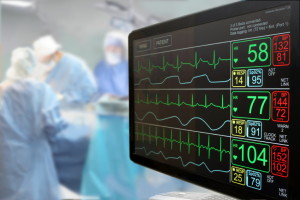
When the time comes to invest in new displays or upgrade components of existing ones, it’s important to consider what specific features are most suitable for the military operations at hand.

Durability, versatility, and flexibility are obviously top priority—especially when embarking on long-term missions in top secret locations. To ensure that your troops are getting the most out of their devices, you have to choose a brand and make that you trust.

Why Your Military Display Should Be Compatible with Environmental Standards

Environmental standards for military displays typically adhere to MIL-STD, also known as MIL-SPEC or MilSpecs. This is the standard of defense in the United States and all military LCD displays and monitors must comply with it in order to be deemed operational and fit to be used in the line of duty or on certain missions that entail exposure to harsh environmental conditions.

Factors to Consider when Choosing a Military Display That Can Withstand Different Environmental Conditions

Thorough planning and preparation is the key to achieving a successful military mission. Knowing the objectives of the mission inside and out is also extremely important as this will play a significant role in determining the types of features that your operation requires. Once you’ve determined the types of LCD display and monitor features you require, you can obtain the proper equipment to meet the environmental standards of your mission.

Here are some common military display and monitor features to consider for various applications.

Temperature Conditions and Fluctuations

Military life can take you to some truly remote and sometimes exotic destinations all over the world. That’s not to make it sound like a vacation, but it’s just a part of the job. Depending on where you’re stationed, temperatures can range from extreme heat to extreme cold. In some cases, severe temperature fluctuations can occur on a daily basis. As a result, you need to make sure you’re well equipped with military LCD displays that are designed to handle all kinds of extreme temperature and weather conditions without hindering performance levels.

Moisture and Debris

High moisture levels and debris are common elements that many military personnel are forced to contend with on a daily basis while on specific missions. High moisture levels and debris present a great deal of operational challenges for electronic devices under these circumstances. As a result, military-grade LCD displays need to be designed to handle condensation, rain, and high humidity levels as well as exposure to dust and sand to ensure the success of the mission without any delays.

Make sure your device has a minimum IP67 rating as this indicates its ability to withstand long periods of water and dust exposure.

Performance Capabilities

Military operations require high performance standards from their LCD devices and monitors. That typically includes an exceptionally long battery life, sunlight readability in extremely bright conditions, brightness adjustability in dark conditions, data interpretation, communication standards, and shock resistance, and so much more.

Specific performance capability standards of your devices depend on the nuances of your mission, so it’s important to have a full understanding of your needs when selecting devices.

Extreme Shock and Constant Vibrations

Military operations and missions can often entail particularly stressful situations in unsafe environments. Devices must be able to sustain high levels of stress, shock, and vibrations to ensure the success of the mission. Device failures or malfunctions in these types of high-stress situations could lead to communication breakdowns and security breaches that could jeopardize the entire mission. As a result, military LCD devices and monitors must be built to be shock- and vibration-resistant under all circumstances.

Multiple Power Input Options

One of the main challenges of working on a remote military mission is finding adequate power input options and supplies for your devices. Hence, military LCD displays and monitors need to be equipped with long-lasting, low power consumption options that continuously support high performance capabilities at all times. Power fluctuations such as over and under-voltage, short circuiting, load dumps, and reverse polarity can also pose potentially serious and difficult obstacles for your military mission. Devices with multiple power input options can overcome and even avoid these challenges.

Electromagnetic Interference

Also known as radiofrequency interference, electromagnetic interference (EMI) is classified as a system malfunction as a result of a disturbance or blockage by an external source. High-efficiency state-of-the-art military LCD displays should be able to counteract and prevent the effects of EMI by actively controlling the amount of interference caused by often unidentified radiofrequencies in their general vicinity. EMIs don’t just disrupt your military mission, but they can also lead to serious data and security breaches that compromise the covert positions of military personnel and leak important information to opposing parties.

Look for a Reputable Manufacturer

Choose a highly reputable and responsive manufacturer that specializes in designing and distributing state-of-the-art military-grade electronic devices. That way, you can have peace of mind in knowing that you’re getting high-quality devices that meet your needs. Consider their customer service capabilities as well. You’ll want to partner with a manufacturer that’s easy to get a hold of, answers all of your questions in a timely manner, and provides you with additional support when you need it.

When military operations in the United States and Canada are in need of high-quality, durable, and dependable military LCD displays and monitors, there’s only one name they trust: Nauticomp Inc. We design and manufacture custom military displays that are capable of meeting your every need and withstanding a wide range of environmental elements and standards. Contact us today to learn more or to place your order.

What Are Some Pros and Cons of TFT Displays?

Posted on: May 26, 2021

Industrial Panel Mount LCD Displays and MonitorsLCD (liquid crystal displays) monitors are available in a variety of modern configurations. Perhaps the most high-tech version of LCDs to rise to prominence in recent decades is the TFT display. Read about the pros and cons of TFT display technology in this article, so that you can make an informed decision about whether or not this is a suitable option for your specific application and project needs.

Features of TFT Displays

TFT stands for thin-film transistor, which means that each pixel in the device has a thin-film transistor attached to it. Transistors are activated by electrical currents that make contact with the pixels to produce impeccable image quality on the screen. Here are some important features of TFT displays.

  • Excellent Colour Display.Top notch colour contrast, clarity, and brightness settings that can be adjusted to accommodate specific application requirements.
  • Extended Half-Life. TFT displays boast a much higher half-life than their LED counterparts and they also come in a variety of size configurations that can impact the device’s half-life depending on usage and other factors.
  • TFT displays can have either resistive or capacitive touch panels.Resistive is usually the standard because it comes at a lower price point, but you can also opt for capacitive which is compatible with most modern smartphones and other devices.
  • TFT displays offer exceptional aspect ratio control.Aspect ratio control contributes to better image clarity and quality by mapping out the number of pixels that are in the source image compared to the resolution pixels on the screen.
  • Monitor ghosting doesn’t occur on TFT displays.This is when a moving image or object has blurry pixels following it across the screen, resembling a ghost.
  • TFT displays are incredibly versatile.The offer a number of different interface options that are compatible with various devices and accommodate the technical capabilities of all users.

Types of TFT LCD Technology

There are two main types of TFT LCD displays:

  • · Twisted nematic TFT LCDs are an older model. They have limited colour options and use 6 bits per each blue, red, and green channel.
  • In-plane switching TFT LCDs are a newer model. Originally introduced in the 1990s by Hitachi, in-plane switching TFT LCDs consist of moving liquid pixels that move in contrast or opposite the plane of the display, rather than alongside it.

Pros of TFT Displays

  • Minimal energy consumption
  • Sharp visibility
  • Excellent physical design
  • Fast and accurate response time
  • Minimizes eye strain
  • Space efficient design (can be placed anywhere in your workspace on a rotational mount so you can turn it in all directions)

Cons of TFT Displays

  • Higher price point than other displays
  • Disproportionate viewing angles
  • Restricted utility due to glass paneling (e.g., ineffective for outdoor use where glass can showcase glares from natural lighting)
  • Relies on backlighting to provide brightness rather than producing its own light, hence, they need built-in light emitting diodes (LEDs) in their backlighting structure

Factors to Consider when Selecting a TFT Display

The type of TFT LCD monitor or industrial display you choose to purchase will depend on the specifications of your application or project. Here are a few important factors to consider when selecting an appropriate TFT LCD display technology:

  • Life expectancy/battery life.Depending on the length of ongoing use and the duration of your project, you’re going to want to choose a device that can last a long time while maintaining quality usage.
  • Touch type and accuracy.What type of activities are you planning on using your device for? If it’s for extended outdoor use, then you should go with projected capacitive touch as this is more precise and accurate. Touch accuracy is important for industrial and commercial applications.
  • Response times.TFT displays typically have faster and more accurate touch response times and performance.
  • Image clarity.Some TFT displays feature infrared touchscreens, while others are layered. The former is preferable, especially in poor lighting conditions or for outdoor and industrial applications, because there’s no overlay and therefore no obstructions to light emittance.
  • The environmental conditions make a difference in operation and image clarity. When choosing a TFT for outdoor or industrial applications, be sure to choose one that can withstand various environmental elements like dust, wind, moisture, dirt, and even sunlight.

As a leading manufacturer and distributor of high-quality digital displays in North America, Nauticomp Inc. can provide custom TFT LCD monitor solutions that are suitable for a multitude of industrial and commercial indoor and outdoor applications. Contact us today to learn more.