Everything You Need to Know About ECDIS in the Marine Industry

Posted on: July 13, 2022

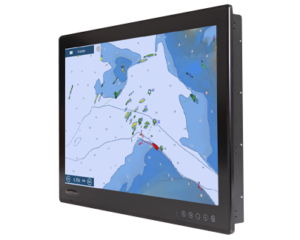
marine display

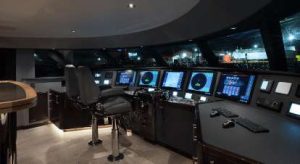
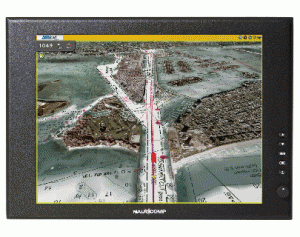
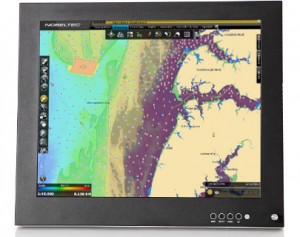
As the marine industry increasingly looks to digitize its operations, one of the most important pieces of technology that vessels are adopting is the electronic chart display and information system, or ECDIS. This system is a type of marine navigation that uses electronic navigational charts to display information about a vessel’s position and the surrounding sea.

If you are working in or supplying products or services to the marine industry, it is important to understand what ECDIS is and how it works. In this blog post, we will provide an overview of ECDIS technology and discuss some of the key considerations when implementing this system on ships.

What Is an Electronic Chart Display and Information System?

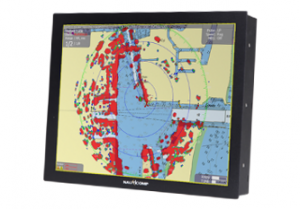
As mentioned above, an ECDIS is a maritime navigation device that displays a vessel’s position and the surrounding sea using digital charts. This system is increasingly being used by vessels as the marine industry looks to digitize its operations.

ECDIS is now a mandatory navigation system on ships trading in European waters. This system replaces the traditional paper charts used on board vessels for navigation. ECDIS presents navigational data on a computer screen, allowing officers to navigate more safely and efficiently.

Types of ECDIS

There are two different types of ECDIS available on the market, each with its own advantages and disadvantages. Below we discuss the different options in more detail.

Raster Navigational Charts

Raster navigational charts are digital images of paper charts. These charts are created by scanning a paper chart and converting it into a digital image file. 

The main advantage of raster chart display systems is that they are relatively easy to use and understand. This type of system is also less expensive than vector chart display systems.

The disadvantages of raster charts include the fact that they can be less accurate than vector charts and they can be more difficult to update.

Vector Navigational Charts

Vector navigational charts are created using electronic vector data. This data is more accurate than raster data, making vector chart display systems more precise tools for marine navigation.

The main disadvantage of vector charts is that they can be more expensive than raster charts. Another downside of vector charts is that they can be more difficult to use and understand than raster charts.

Why Use Bigger Marine Monitors for ECDIS?

Marine displays have to meet the strictest standards for quality and durability. That’s why marine LCDs and monitors are designed specifically for use in harsh marine environments.

When it comes to ECDIS, bigger is usually better. A larger marine display will give you a better view of the digital charts and information being displayed. This is especially important when navigating unfamiliar waters.

Some marine displays are even designed to be used in multi-display setups, giving you an even larger view of the navigational data.

Multi-touch marine displays are also becoming more popular, as they offer a more intuitive way to interact with the ECDIS system. Waterproof marine displays are another option to consider, as they can be used in all weather conditions.

Safety Parameters for an ECDIS Marine Displays

There are several safety parameters that should be considered when setting up an ECDIS marine display. These settings include:

  • The safe navigation area
  • The safe distance from land
  • The depth of water
  • The speed of the vessel
  • The type of vessel

Key Considerations for Implementing ECDIS

There are a few key considerations to keep in mind when implementing an ECDIS system on board a vessel.

First, the system must be able to meet the specific navigational needs of the vessel. Second, the system must be easy to use and understand. And third, the system must be able to integrate with other onboard systems.

Some marine displays are designed specifically for use with ECDIS systems. These displays usually have larger screen sizes and higher resolutions, making them ideal for viewing digital charts and navigational data.

What Are the ECDIS Marine Display Requirements?

There are several requirements that must be met in order to use an ECDIS marine display.

  • Must Display SENC Information: The marine display must be able to display System Electronic Navigational Chart information. SENC is the digital chart data that is used by the ECDIS system.
  • Must Be DGNSS Compatible: The marine display must be compatible with Differential GPS (DGNSS) systems.
  • Must Meet IMO Standards: The marine display must meet the standards set by the International Maritime Organization (IMO).
  • Must Be Type-Approved: The marine display must be type-approved by a recognized marine organization. Some marine displays are specifically designed for use with ECDIS systems and have been type-approved by the IMO. Marine displays have to meet the strictest standards for quality and durability.
  • Must Show the Information Scale: The marine display must be able to show the correct scale for the navigational data being displayed.
  • Must Display Screen Specification: The marine display must have a screen that is large enough to show the navigational data being displayed.
  • Must Show Chart Features: The marine display must be able to show all of the features that are required for safe navigation.
  • Must Have Data Overlay: The marine display must be able to overlay the navigational data on top of the chart data.
  • Must Have Symbols, Fonts, and Colours: The marine display must be able to show the required symbols, fonts, and colours.

Contact Nauticomp to Know About the Different Marine Monitors

Vessels of all sizes are increasingly using ECDIS to navigate their way through the water, and as this technology continues to develop, it is important that mariners understand how these systems work.

If you’re looking for more information about electronic chart displays or any other marine monitors, be sure to get in touch with Nauticomp, Inc. We provide world-class fully customizable touchscreen displays for commercial and industrial settings and can help you find the perfect system for your vessel. Contact us today to learn more.
What Are TFT LCD Displays and Modules?

Posted on: June 7, 2022

sunlight readable LCD

A thin-film transistor liquid crystal display, TFT LCD display for short, is a type of LCD display that uses thin-film transistor technology to improve image quality.

TFT LCD displays have many advantages over traditional LCD displays. While traditional LCDs use a single layer of transistors, TFT LCDs use a thin film of transistors. This allows for better image quality, as well as improved response time and lower power consumption. TFT LCDs are also thinner and lighter than traditional LCDs, making them ideal for use in portable devices.

When choosing a TFT LCD, it is important to consider the viewing angle and colour reproduction. While TFT IPS displays offer better image quality, they are also more expensive.

Keep reading to learn more about TFT LCD displays, how they work, and their various applications.

How Do TFT LCDs Work?

TFT LCDs are made up of two main parts: the transistor array and the colour filter array.

The thin-film transistor array is the layer of transistors that are made of a material such as silicon. The array of transistors is connected to the control circuitry. The control circuitry contains the drivers that control the voltage applied to the transistors.

The colour filter array is the layer of the LCD that contains the colour filters. The colour filters are made of dyes or pigments and are arranged in a specific pattern. The most common patterns are RGB (red, green, blue) and CMYK (cyan, magenta, yellow, black).

When a voltage is applied to the transistor array, the transistors turn on and allow light to pass through. This light is then converted into an image by the colour filter array.

Applications of TFT LCD Displays

TFT LCDs are used in a wide variety of industries, including consumer electronics, computing, telecommunications, automotive, and medical to name a few. Specifically, they are used in:

  • Computers and laptop computers
  • Televisions
  • Mobile phones
  • Smartphones and tablets
  • Video game consoles
  • Digital cameras
  • Portable media players
  • GPS devices
  • Industrial and medical equipment

What Are the Key Parts of a TFT Display Module?

In addition to the thin-film transistor array and the colour filter array, a typical TFT display module includes many parts.

Liquid Crystal Layer

The liquid crystal layer is the layer of the LCD that contains the liquid crystals. The liquid crystals are made of materials such as nematic or cholesteric.

The liquid crystals are arranged in a specific pattern. The most common patterns are twist nematic (TN), super twisted nematic (STN), and in-plane switching (IPS). The liquid crystals are aligned with the electric field and are controlled by the voltage applied to the electrodes.

When an electric field is applied, the liquid crystals twist. This twisting allows light of a specific color to pass through. The light is then modulated by the liquid crystal layer.

Cover Glass

The cover glass protects the LCD from damage and provides a surface on which the user can interact with the display.

TFT LCDs use two types of cover glass. Rigid cover glass is made of either soda-lime glass or Gorilla Glass. Flexible cover glass is used in some TFT LCDs, such as those used in mobile phones. The flexible cover glass is more resistant to breakage than rigid cover glass, making it ideal for use in portable devices. 

Backlight Unit

The backlight is the layer of the LCD that emits light. Backlights can be made up of light-emitting diodes (LEDs), an electroluminescent panel (ELP), cold cathode fluorescent lamps (CCFLs), and hot cathode fluorescent lamps (HCFLs), or external electrode fluorescent lamps (EEFLs).

Backlights are most often used in smaller displays to increase their readability in low light conditions.

Touchscreen

The touchscreen is an optional part of the display module that allows the user to interact with the display. A touchscreen is a layer of glass that is coated with a material that is sensitive to pressure. When the user presses on the touchscreen, the pressure is registered and converted into an electrical signal.

There are various types of touchscreens available including capacitive touchscreens, resistive touchscreens, and surface acoustic wave touchscreens.

Bezel

The bezel is another optional part of the display module. It is used to protect the display module from damage.

Driver IC

The driver IC is responsible for driving the TFT LCD panel. It converts digital signals into analog signals that can be used by the TFT LCD panel.

What Are the Advantages and Disadvantages of TFT LCDs?

TFT LCDs offer a number of advantages over traditional LCDs, including:

  • Improved image quality
  • Faster response time
  • Lower power consumption
  • Thinner and lighter weight
  • Increased durability

That said, TFT LCDs also have a number of disadvantages, including:

  • Higher cost
  • Reduced contrast in low light conditions
  • Viewing angle is limited

Contact Nauticomp to Learn More about Industrial LCD Displays

Nauticomp Inc. is a leading provider of industrial LCD displays. Our products are designed for use in a variety of industries, including maritime, aerospace, and military. We offer a wide range of LCDs, including TFT LCDs, OLEDs, and LEDs. Contact us today to learn more about our products and services.


AMOLED vs. TFT: Which Display Technology Is Best?

Posted on: May 9, 2022

Titan Commercial Grade LED Display

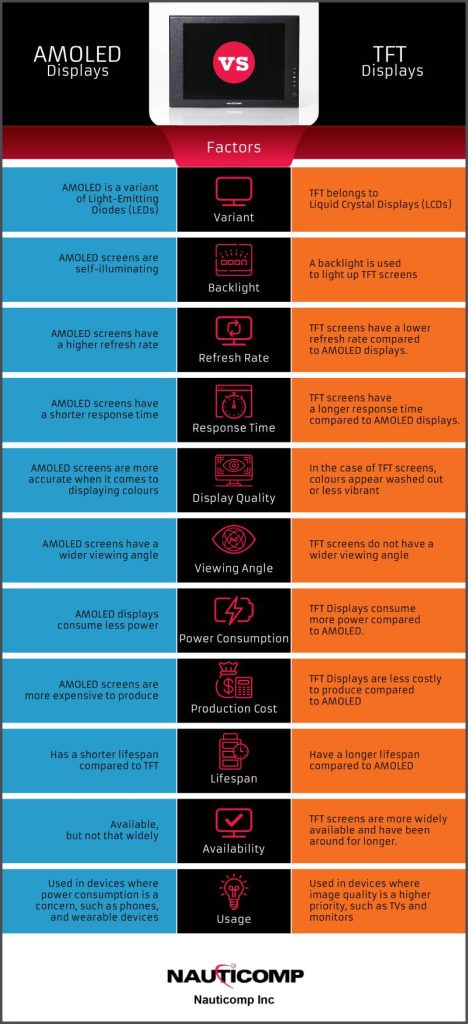
AMOLED and TFT are two types of display technology used in smartphones. AMOLED (active-matrix organic light-emitting diode) displays are made up of tiny organic light-emitting diodes, while TFT (Thin-Film Transistor) displays use inorganic thin-film transistors.

AMOLEDs are made from organic materials that emit light when an electric current is passed through them, while TFTs use a matrix of tiny transistors to control the flow of electricity to the display.

Both technologies have their own advantages and disadvantages. So, how do you know which one is best for your needs? We compare these two technologies below.

What Are the Main Differences between AMOLED and TFT Displays? 

AMOLED vs TFT Displays

  • Backlight: One of the main differences between AMOLED and TFT displays is how they are lit up. A backlight is used to light up TFT screens, while AMOLED screens are self-illuminating. This means that TFT displays require more power to operate than AMOLED displays.
  • Refresh Rate: Another key difference between AMOLED and TFT displays is the refresh rate. The refresh rate is how often the image on the screen is updated. AMOLED screens have a higher refresh rate than TFT screens, which means that they can display images more quickly and smoothly.
  • Response Time: The response time is how long it takes for the pixels to change from one colour to another. AMOLED screens have a shorter response time than TFT screens..
  • Colour Accuracy/Display Quality: AMOLED screens are more accurate when it comes to displaying colours. This is because each pixel on an AMOLED screen emits its own light, which means that the colours are more pure and true to life. TFT screens, on the other hand, use a backlight to illuminate the pixels, which can cause the colours to appear washed out or less vibrant.
  • Viewing Angle: The viewing angle is the angle at which you can see the screen. AMOLED screens have a wider viewing angle than TFT screens, which means that you can see the screen from more angles without the colours looking distorted.
  • Power Consumption: One of the main advantages of AMOLED displays is that they consume less power than TFT displays. This is because the pixels on an AMOLED screen only light up when they need to, while the pixels on a TFT screen are always illuminated by the backlight.
  • Production Cost: AMOLED screens are more expensive to produce than TFT screens. This is because the manufacturing process for AMOLED screens is more complex, and the materials used are more expensive.
  • Lifespan: AMOLED screens have a shorter life span than TFT screens since the organic materials used in AMOLED screens can degrade over time.
  • Availability: TFT screens are more widely available than AMOLED screens and have been around for longer. They are typically used in a variety of devices, ranging from phones to TVs.
  • Usage: AMOLED screens are typically used in devices where power consumption is a concern, such as phones and wearable devices. TFT screens are more commonly used in devices where image quality is a higher priority, such as TVs and monitors.

Which Display Technology Is Best?

AMOLED and TFT are two different types of display technology. AMOLED displays are typically brighter and more vibrant, but they are more expensive to produce. TFT displays are cheaper to produce, but they are not as bright or power efficient as AMOLED displays.

The display technology that is best for you will depend on your needs and preferences. If you need a screen that is bright and vibrant, then an AMOLED display is a good choice. If you need a screen that is cheaper to produce, then a TFT display is a good choice. However, if you’re worried about image retention, then TFT may be a better option.

Ultimately, it’s up to you to decide which type of display is best for your needs.

Nauticomp Inc. provides world-class fully customizable touchscreen displays for commercial and industrial settings. With features like sunlight readability, brightness adjustability, infrared lighting, full backlighting, all-weather capabilities, etc., our displays are second to none. Contact us today to learn more.
PLS vs. IPS: Which Digital Panel Type Is Best for LCD Monitors and Displays?

Posted on: April 14, 2022

rack mounted displays

When it comes to choosing the right panel type of your LCD monitor, the options are seemingly endless. We’ve discussed the differences between AMOLED and LCD displays as well as the different types of touchscreen monitors that are commonly used for various devices and their benefits. Now it’s time to learn about the different features and specifications of PLS and IPS panels so you can decide which one is the most suitable choice for your specific personal or professional applications.

What Is a PLS Panel?

PLS stands for plane to line switching. Also referred to as Super PLS Panel, this technology boasts superior technological advancements such as a multitude of brightness setting options, crystal-clear image quality, and adjustable viewing angles without breaking the bank.

What Is an IPS Panel?

IPS stands for in-plane switching. It’s one of the most commonly used monitors for LCD displays and it consists of two glass panels that hold a layer of liquid crystals in between them. The liquid crystals become animated and perform predetermined actions such as moving in a specific direction or displaying certain colours when they’re charged with an electric current. These actions result in the high-quality images that appear on your television, laptop, or smartphone screen.

How Do IPS and PLS Panels Work?

Both LCD monitor panel types have their advantages and disadvantages for various types of applications. Finding out how they work will help you determine which one is the best choice for your needs.

IPS for LCD Monitors

As mentioned, IPS LCD monitors contain hundreds of liquid crystals that are situated between two glass sheets in a parallel formation. As electric currents run through the liquid crystals when the screen is turned on, they become animated and move in different directions and backlighting passes through them. This is what produces the crystal-clear and instantaneous images you see on the screen. The excellent viewing angles are the result of the horizontal movements of the liquid crystals inside the panel.

PLS Panels for LCD Monitors

PLS panels for LCD monitors have been on the market for over a decade and have proven to be a worthy adversary for their IPS predecessors. Although the technology is the same for the most part, IPS does offer some minor improvements. The main difference is that IPS panels offer more optimized liquid molecular alignment, which makes for a slightly better viewing experience. Hence, PLS screens offer 15% more brightness than IPS panel types.

From an aesthetic and logistical standpoint, PLS panel types are also thinner than IPS due to the fact that the glass sheets that hold the liquid crystals in place are positioned much lower in the screen configuration.

What are the Differences between IPS and PLS LCD Monitor Panel Types?

When it comes to comparing and contrasting the differences between IPS and PLS LCD monitor panel types, the competition is pretty stiff. Both monitors are fairly similar with the exception that PLS is meant to be an improvement on the previous technology. Here are the key factors that should be considered when deciding which one is the best monitor panel for LCD industrial displays.

Viewing Angles

PLS monitors offer superior viewing angles when compared to IPS displays. Unlike IPS displays, PLS monitors don’t have any noticeable colour distortions and they have significantly lower production costs.

Image Quality

Colour contrast and brightness is a central concern when purchasing a new commercial or industrial display. Whether you’re a gamer or graphic designer, your best option in this regard is to stick to IPS displays. They offer far more consistent image quality, colour contrast, and brightness that’s perfect for applications that rely heavily on high-quality image production. 

Response Time

Unfortunately, PLS and IPS monitors both have a fairly slow response time (the amount of time it takes for liquid crystals to shift from one colour or shade to another). For this reason, neither one is the ideal choice for gaming purposes, but they’re both suitable for graphic design projects that focus more on colour distribution and accuracy than response time.

Colour Distribution

PLS panel types have been proven to have superior colour distribution and accuracy compared to IPS panel types. PLS displays have a far more expansive colour gamut that’s ideal for users who require the most natural-looking images and colour options.

Backlight Bleed

Backlight bleed occurs when the lights from the back of the screen leak through the edges, which results in uneven lighting or glow. This is a fairly common shortcoming of IPS screens when the brightness is adjusted to a particularly high level and can make for a poor viewing experience. PLS panel types don’t have this problem and offer even lighting regardless of the brightness settings.

Which One Is the Better Choice for LCD Monitors?

The answer is inconclusive. Both IPS and PLS monitor types certainly have their advantages. Although PLS is slightly better in terms of backlighting and faster response times, the margins for improvement are fairly tight. It really just depends on what your preferences are as well as the applications that the monitors are being used for.

Nauticomp Inc. is one of the leading manufacturers and distributors of sophisticated state-of-the-art LCD displays and monitors in North America. Contact us to learn about our various products or to place an order.


What Is a Touchscreen Digitizer and How Does It Work?

Posted on: April 4, 2022

waterproof touchscreen monitor

Touchscreen devices consist of numerous different components that must work cohesively together in order to make it functional. The touch sensor, controller, and the software all play important roles. But there’s one component that’s often overlooked in the equation and that’s the touchscreen digitizer. This is the component that allows users to directly interact with what’s on the screen and issue commands.

What Is a Touchscreen Digitizer?

As you know, touchscreen devices consist of multiple layers each of which serve a different purpose and carry out various functions. The purpose of the touchscreen digitizer glass layer is essentially to translate or convert physical touch commands into digital signals that the device can understand and then carry out.

What Is the Difference between Touchscreen Digitizers and LCD Displays?

Commercial and industrial displays such as capacitive and resistive screens all feature touchscreen digitizers that are placed on top of and connected to the LCD layer using a flex cable. While the LCD layer is responsible for displaying sharp and crystal-clear images on the screen, the LCD touchscreen digitizer reads, understands, and translates the commands given so that the device can perform the appropriate functions.

Are Touchscreen Digitizers Necessary for Every Device?

Touchscreen digitizers are fairly common components of modern LCD displays, but not all of them are equipped with one. The sole purpose of an LCD display touchscreen digitizer is to convert touch commands on the top layer into digital data that the device can understand and perform. Once the touch commands are converted into digital data, the device can then perform the required function and change the images displayed on the screen accordingly. 

Can the Device Still be Used if the Touchscreen Digitizer is Damaged?

Touchscreen digitizers are made of a single glass layer, which means they can be susceptible to damage if the device is dropped or comes into contact with a brute force. Although the device can still marginally function depending on the extent of the damage to the touchscreen digitizer glass, its functionality and ability to comprehend touch commands may be limited. If the glass is completely shattered, then the device won’t be able to interpret touch commands at all.

When Do You Need to Replace Your LCD Screen or Touchscreen Digitizer?

The LCD and touchscreen digitizer layers of a device display serve completely different functions, but they work in tandem to maximize user experience and device performance. Since both of these components are made of thin glass layers, they’re not impervious to damages such as cracks or scratches as a result of being dropped or coming into contact with external physical stressors.

Eventually, the time may come when you need to replace either the LCD or touchscreen digitizer glass layer of your smartphone or laptop.

Here are a few common types of damage that your screen could endure over time.

Shattered touchscreen digitizer

If it’s only the touchscreen digitizer that’s broken, you’ll still be able to make out what’s being displayed on the screen by the LCD component for the most part. The only difference is that parts of the screen or the entire screen might be unresponsive to your touch commands as a result of the damages. Moreover, blobs or splotchy images may appear in certain parts of the screen.

Non-responsive touchscreen digitizer

This indicates that there’s a disconnection between the touchscreen digitizer and the LCD display, which is preventing the device from performing the desired functions issued by touch commands.

Pixelated LCD screen

The LCD screen is responsible for the visual component of your device. Pixelation in the form of multicoloured splotches or dots throughout the screen indicates that the LCD component has sustained a certain level of damage. It can be caused by wear and tear over time or if your device sustains physical damage.

Damaged or black screen

A black screen indicates that the LCD layer of the device is damaged. The device itself will most likely still turn on and function like normal, but you won’t be able to see what it’s doing on the screen itself. Typically, this just means that the LCD layer needs to be repaired or replaced. Depending on the extent of the damage, it might be more practical and cost-effective to simply purchase a new device altogether unless you’re still within the warranty period.

Contact Nauticomp Inc. to Learn about Touchscreen LCD Displays and Monitors

Nauticomp Inc. is one of the leading digital device manufacturers and distributors in North America and the UK. We deliver high-quality state-of-the-art commercial and industrial displays that can be custom-tailored according to the specific needs of our customers. Contact us today to learn more about our products or to place an order.

What Is the Difference between AMOLED and LCD Displays?

Posted on: March 10, 2022

Glass Bridge Monitors

Screen technology, quality, and visibility are just some of the most important factors to consider when choosing between AMOLED and LCD displays. Average consumers might not necessarily know the difference between these two types of devices or why one is preferable to the other. In this article, we’ll draw comparisons between LCD vs. AMOLED displays so you can decide which type of screen is the right choice for your personal or professional applications.

What Is AMOLED and Super AMOLED?

First, it’s important to note that AMOLED and Super AMOLEDs are both types of OLED display technology. OLED stands for Organic Light Emitting Diode. This is a type of thin-film display technology that’s built directly into the screen. The electroluminescent materials, also known as the light emitting diodes, immediately light up when they contact electricity.

AMOLED is an acronym that stands for active-matrix light-emitting diodes. This is a step up from traditional OLEDs. The basic concept of lighting up crystal diodes using electricity is the same, but the execution is slightly different. Each pixel inside of AMOLED displays consists of individual thin-film transistor strips that light up when an electrical current runs through them.

Super AMOLED devices are also descendants of the OLED technological display family. Commonly used for smartphones, AMOLEDs feature innovative touch technology integrated directly into the screen rather than including a separate thin film on top of the screen.

What Is the Difference between AMOLED vs. LCD Displays?

If you frequently use electronic devices, chances are very high that you’ve most likely come across an LCD (liquid crystal display) in some capacity. Common applications for LCDs include electronic billboards, computer and laptop monitors, digital cameras, portable electronic games, and the list goes on. LCDs are flat-panel displays. They consist of liquid crystal films that are sandwiched between two thin polarized glass layers. Backlighting is used to activate the crystals and illuminate the screen to present the desired image to the user.

Here’s a table that compares the differences between industrial LCDs vs. AMOLED displays.

AMOLED LCD
Picture Quality – Excellent picture quality with vivid colours, brightness, and contrast

– No backlighting means the display powers off pixels when showing the black portions of an image

– Brighter overall picture quality, colours are true to life
Image pixels and colours – Enhanced, bright, and vibrant colour contrast

– Pixels supply their own light source, which results in more consistent lighting throughout the entire screen without any dark or light spots

– Subdued, but accurate colour contrast and visibility

– Dark and light spots may occur throughout the screen if each pixel doesn’t receive the same amount of backlighting

Screen size and technology – AMOLEDs eliminate the need for a backlighting layer, so the screens can be made thinner – LCDs feature a backlighting layer, they require a thicker design, and will always be bulkier than AMOLEDs
Screen burn – Eventually, the pixels will burn out faster or get stuck showing only certain colours with continued use

– Icon shadowing is a bigger concern for laptops and smartphones, but you can prevent this from happening by moving your icons around every so often

– Screen burn isn’t an issue for LEDs because they rely on backlighting
Outdoor visibility and viewing angles – Side viewing angles aren’t ideal, better to view the device straight-on – Superior off-axis viewing angles and sunlight readability due to IPS technology
Reliability and durability – More susceptible to pixel burnout over time; if one pixel burns out, then they can all go out or get stuck

– More fragile and can crack if damaged or dropped

– Far more durable and can withstand more pressure or greater impact

– Backlighting prevents pixels from burning out

Power efficiency and battery consumption – More energy-efficient when showing black because the device shuts off pixels that don’t need to be used; this helps the battery last longer on a single charge – Backlight is always on, which reduces energy-efficiency and eats up battery life a lot faster
Flexibility and adaptability – Flexible, which means they’re ideal for curved screen designs especially used for wearable technology (watches, go-pros, etc.) – They can’t be bent, moulded, or made into a curved design and this limits their functionality
Display prices – Higher price point because they cost more to design and manufacture – Require more layers, but they use a slightly more affordable technology and have been around for years, which means all of the kinks have already been ironed out of the design and manufacturing process

Which Is Better: AMOLED or LCD?

That depends on what you need the device for and how much you are willing or able to spend. For basic and everyday applications, you’re probably better off purchasing a standard LCD device. But if you’re looking for enhanced picture quality with excellent colour contrast and have an expansive budget, then AMOLED is probably the right device for you.

At Nauticomp Inc., we’re always at the forefront of state-of-the-art commercial and industrial display design and manufacturing. Our devices are customizable and suitable for a wide range of applications from military ops to retail POS, and so much more. Contact us today to learn more.
Know About the Basic Components of Industrial LCD Monitors

Posted on: March 1, 2022

sunlight readable LCD

Industrial LCD (liquid crystal display) monitors are a common technological fixture for a variety of Marine, military, and even commercial applications. These monitors have internal mechanisms that allow them to display specific images according to the user’s commands. In order for the screen to work, all of the internal components that make up the mechanism must function at full capacity. Liquid crystals are the main components that contribute to the picture quality, sharpness, and brightness, but there are also other crucial elements at play inside each screen.

Important Components of LCD Monitors

There’s a lot more to LCD monitors than meets the eye. The following LCD components are crucial to making your computer screen function optimally.

1. LED Backlight

Every computer screen has an LED backlight that produces white light. The light then travels through many different layers to produce an image on the screen. Flat panel displays feature LED backlights because they reduce overheating, have higher contrast ratios, more extensive brightness settings, and excellent overall colour reproduction.

2. Liquid Crystals

Although they don’t produce light, liquid crystals are electrically charged molecules that have the ability to block or allow light to pass through. Electrical voltages are used to charge each liquid crystal and maneuver them to form specific patterns that result in the images that appear on computer screens.

3. Transparent Conductive Screen Layers

In order for a screen to function properly and display crystal clear images without interruption, every single pixel needs to be charged with an electric current. Transparent conductive screen layers made from materials like indium allow the electric currents to pass through with ease. 

4. Reflector Sheet

Also known as a dual-action brightness enhancement film (DBEF), the reflector sheet increases the brightness level of the screen by reflecting the light diodes produced by the backlight. A single brightness enhancement film has the ability to increase brightness levels by about 40% to 60%. Certain applications that require maximum brightness levels use two reflector sheets to further enhance luminance.

5. Light Guide Plate

The light guide plate is a weather-resistant transparent corrugated stiff plastic panel that controls the angle and direction in which light is displayed. As the light enters the back of the panel, the pattern formed by the ridges on the front guides it into different directions to illuminate the pixels and form the images that appear on the screen.

6. Diffuser Sheet

Diffuser sheets disperse the light evenly across the screen to eliminate the risk of hot spots that can cause the screen to overheat quickly. Spreading the light evenly across the screen also enhances the visibility and clarity of the images of the screen and reduces eyestrain by producing a softer lighting output.

7. Prism Sheet

Once the diffuser sheet evenly disperses the light, the prism sheet enhances the brightness level by further refining the light produced by the backlight. Located on the front of the light guide plate, the prism sheet consists of front-facing ridges that are on an angle to ensure that the light is transmitted at the best possible viewing angles for the user.

8. Polarized Glass Sheet

LCD monitors feature two polarized glass sheets that function as filters that make it possible for users to clearly view images on the screen. The liquid crystals are located between the two layers of polarizing sheets. Essentially, polarizers allow vertical light waves to pass through the filter and contact the light bending liquid crystals. Horizontal light waves are blocked or filtered out because they distort the image quality. Since they’re made of a plastic-like material, polarizers are sensitive to extremely humid and hot temperature conditions.

9. Glass Substrate (Backplane)

Backplanes are typically used in thin-film transistor (TFT) LCD monitors. Located toward the front of the screen, this glass substrate displays the images that result from the dual polarization process to the end-user.

10. Power Supply and Common Electrode

Modern LCD monitors use a material called indium-tin-oxide, which acts as the main power source for the entire screen and its light-emitting functions. This common electrode sends required voltage levels to activate and manipulate the liquid crystals. Most of the white light produced by the backlight is blocked out and colour filters are used to create crystal clear images on the screen. Colour filters consist of the primary colours red, blue, and green.

The final layer, which is the top polarizer, filters the polarized light even more to produce the optimal viewing experience. 

High-Tech Industrial LCD Monitors in North America

Nauticomp Inc. is one of the leading North American distributors of military, marine, commercial, and industrial LCD monitors. With 25 years of experience in the technological space, we’ve mastered the art of designing and crafting top-of-the-line digital displays that are custom-tailored to the needs of our customers. Contact us today to learn more.
IPS Display Market Trends in 2022

Posted on: February 14, 2022

sunlight readable displays and monitors

IPS (in-plane switching) displays are a type of liquid crystal display (LCD) screen in which the liquid crystals are strategically placed between two layers of glass. The liquid crystals are arranged in a predetermined parallel pattern. 

IPS displays are the next generation of screens. They’re meant to be an improvement on the preceding twisted nematic (TN) matrix LCDs, which have a few obvious limitations such as small viewing angles that are inadequate and low colour reproduction quality. 

On the other hand, IPS displays provide a much more rapid colour reproduction quality and expansive viewing angles for an enhanced user experience. These features also make it a more versatile display that can be used for a wide range of industrial, commercial, and even medical applications. Modern technological devices including smartphones, TVs, tablets, and PCs all have built-in IPS technology. They’re also widely used in various fields that require high-quality screens such as broadcasting, professional design applications, and healthcare. 

IPS Display Market Trends

  • Rise in Demand for IPS Displays – The IPS display market is predicted to reach a value of nearly $75 billion (USD) by the year 2025 with a compound annual growth rate (CAGR) of 6.4% according to a Market Research Future report. The forecast analysis period of the report is between 2019 and 2025. 
  • Asia Pacific to Lead the IPS Display Market – Since the majority of the IPS display market exists in Asian countries, it stands to reason that the Asia Pacific market will lead the economic growth projections on a global scale.

Key Players in the Global IPS Display Market 2022  

Key players in the global IPS display market in 2022 by company and country include:

  • Au Optronics (Taiwan)
  • Acer Inc. (Taiwan)
  • Lenovo Group Limited (China)
  • WINSTAR Display Co., Ltd. (Taiwan)
  • LG Display (South Korea)
  • Samsung Electronics Co., Ltd. (South Korea)
  • Sony Corporation (Japan)
  • Japan Display (Japan)
  • Panasonic Corporation (Japan)
  • AsusTek Computer Inc. (Taiwan)
  • Dell (United States) 

Drivers and Restraints

IPS display market trends also predict that the main drivers of the tremendous uptick in this technology across various markets can be attributed to the following traits: 

  • A growing demand for camera-enabled mobile devices
  • Low battery power consumption (longer lasting battery on a single charge)
  • More compact complementary metal oxide semiconductor (CMOS) image sensor
  • Biometric Applications that use more image sensors 

IPS LCD displays boast a variety of improvements over their predecessors, which is a major driver of market growth over the next few years. With enhanced crystal-clear picture quality, accuracy, wider viewing angles, increased brightness settings and adjustability, there’s no question that IPS monitors are the top choice in various professional fields where screen accuracy is vital. 

Industries where IPS displays are most commonly used include broadcasting, healthcare, and professional video production. They’re also a popular choice for commercial everyday use. The sharp colour compositions, image clarity, expansive viewing angles, and fast refresh rates make IPS displays perfect for recreational purposes like watching movies or TV shows and gaming. 

The fast refresh rate offered by IPS displays is also the main reason they’re used for tablets, laptops, and smartphones. This eliminates screen functionality delays and makes for a much smoother overall browsing experience for users. IPS market growth can also be attributed to other important factors including:

  • The expanding consumer electronic market
  • Increasing competition among key players in the industry
  • And the greater need for state-of-the-art technological developments across various fields of application 

Some noteworthy restraints mentioned in the report include:

  • Consumption in charge coupled device (CCD) image sensors
  • Market decline for digital still cameras

How Did COVID-19 Change the Landscape of the Global IPS Displays Market?

The COVID-19 health crisis has had a tremendous ripple effect on virtually every industry across the globe. After healthcare, supply chains and logistics industries have arguably suffered the most financially. 

International government mandates, lockdowns, restrictions, and border closures throughout the course of the pandemic all had a significant and unparalleled negative impact on the trade of goods on a global scale. Supply chain disruptions, factory closures, workforce decreases, and economic downturns were just the icing on the cake. However, there is a light at the end of the tunnel. Although production and logistics costs have gone up, lifting lockdowns and relaxing restrictions and mandates have put the market back on a positive, albeit somewhat fragile, trajectory for the time being. 

If anything, the pandemic also inadvertently highlighted the growing demand for better quality technology that allows for long-distance communications.  

Promising and Widespread Market Growth Opportunities Are Also on the Rise

Considering the technologically advanced features offered by IPS displays, the future looks bright (pun intended) for these state-of-the-art industrial LCD displays. Enhanced colour contrast, brightness settings, spectacular image clarity, and reproduction speed mean that an increasing number of industries are integrating this technology into their platforms. 

This increases the demand for IPS displays across a wide range of international markets and secures its growing popularity in the coming years. Graphic designers, additive manufacturing (3D printing) companies, professional photographers, and computer-aided design (CAD) engineers can all benefit greatly from using this technology. 

Segmentation Analysis

The aforementioned Global IPS Display Market Analysis demonstrates the projected international growth trajectory of IPS display usage and analyzes influential market trends. 

It also provides a detailed market analysis and general overview that’s segmented into the following categories:

  • Technology type 
    • Advanced High Performance IPS (AH IPS, which is the current standard)
    • Enhanced IPS (e-IPS, which is no longer in circulation)
    • And others
  • Application (smartphone, tablet, TVs, PCs, etc.)
  • Region (North America, Europe, Asia Pacific, Middle East and Africa, South America)

Market By Industry

Starting on a general regional basis, the report analyzes the current standing of the IPS display market across several continents. Then it goes into further detail to forecast the growth trajectory of IPS technology in specific countries. These sub-segments showcase the supply and demand patterns for this technology in markets consisting of 18 countries in total. In addition to future forecasts, it also exhibits current trends for each region and draws comparisons between each of them. 

Nauticomp Inc.: Industrial LCD Display Manufacturers

Nauticomp Inc. is a leading distributor of state-of-the-art industrial IPS LCD displays in North America and the UK. Contact us to learn about our wide range of digital displays and monitors.

Understanding Weatherproof and Waterproof IP Ratings

Posted on: February 5, 2022

signature II series

Marine displays are frequently thrust into extremely harsh environmental conditions and sometimes dangerous situations. Waterproof displays that are capable of handling virtually any type of natural element have become the standard when it comes to developing state-of-the-art Marines technology. Outdoor weatherproof displays feature standardized IP ratings that indicate their level of ability to withstand exposure to moisture, dust, and dirt.

Born out of necessity for military and marines use, weatherproof display enclosures were once rare technological features. Now, they’re being used for a variety of devices including smartphones and tablets.

What Do IP Codes/Numbers Represent?

IP stands for Ingress Protection or International/Internal Protection mark. This is a standard internationally recognized rating system that indicates the performance of technological protective enclosures. IP ratings signify how effectively certain technological devices are protected against various external elements such as dust, moisture, and dirt.

Once these elements infiltrate the internal mechanisms of electronic devices, they can cause serious damage and render the device ineffectual or damaged beyond repair. The International Electrical Commission dictates the global standard for rating the performance of these protective enclosures. IP ratings consist of two digits that represent different characteristics:

  • The first number indicates the level of solid particle (e.g., dust, dirt, crumbs, etc.) protection the enclosure provides
  • The second number indicates the level of liquid particle (water droplets, water submersion, spilled drink, etc.) protection the enclosure provides

What Is an IP68 Waterproof Display Rating?

An IP68 waterproof rating is the very highest standard for any device. IP68 enclosures offer total protection against the ingress of any type of foreign substances. Six is the top of the scale for protection against solid particle ingress and 8 is the highest level of protection against liquid ingress.

What Is an IP65 and IP53 Rating?

Certain devices can have multiple IP ratings. These ratings indicate that the devices were tested for numerous different types of weather and environmental conditions. Each rating indicates the enclosure’s protective performance in those specific environments. An IP68 rating indicates that a device can handle being submerged in water that’s deeper than one meter.

If a device also has an IP65 rating, this indicates that it can also withstand being sprayed by a liquid or exposed to heavy rain and other wet conditions. An IP53 rating is significantly lower in both regards. These devices are mostly resistant to debris and dust, but they have fairly low resistance to contact with liquid.

What Are Some Applications for IP68 Enclosures?

Since IP68 enclosures are classified as completely waterproof computer monitors, this makes them the ideal choice for virtually any type of extremely demanding outdoor applications.

As a result, Marine and military waterproof LCD monitors are typically required to have a standard IP68 rating to ensure safe and effective operation at all times.

Other uses and applications can include:

  • Devices that are used in areas with high risk of flooding or moisture exposure
  • Water treatment facilities
  • Devices that are primarily for any type of outdoor use

Nauticomp Inc.’s Waterproof and Weatherproof LCD Monitors for the Marine Industry

Nauticomp Inc. is one of the leading suppliers of high-quality, reliable, and durable Marine and military-grade outdoor weatherproof and waterproof displays. We have a range of outdoor weatherproof displays such as the Glass Bridge Elite, the Signature II Series, and the Genesis Series that are always prepared for the task. Contact us today to learn more about our products and how they can enhance your mission.

Factors to Consider when Selecting an LCD Display

Posted on: January 26, 2022

Glass bridge elite

Industrial and commercial LCD displays and monitors play an essential role in every business’s digital marketing strategy. These displays have unique audio and visually enhanced features that can take your digital advertising to the next level and grab the attention of your customers even from afar. From billboards to interactive storefront signage and product displays, waterproof and sunlight readable LCD monitors have many different applications. Here are some factors that should influence your purchasing decision.

Screen Size

Screen size should be determined by the location of your LCD display. For optimal advertising efficacy, make sure that the LCD monitor is installed in a visible area that’s free of any physical obstructions. Consider the distance from which your audience will be viewing the screen when deciding on the size. Outdoor LCD monitors used for advertising should be significantly larger than those that are used in indoor settings or for office applications.

Pixel Aspect Ratios

Also known as resolution, pixel aspect ratios indicate the number of horizontal and vertical pixels that an industrial LCD screen contains. This affects the quality of videos and images on the screen. Most modern screens have a higher resolution or aspect ratio like 1920p:1080p. That’s 1920 pixels running horizontally with 1080 pixels running vertically across your screen for optimal image clarity. The larger your screen is, the higher the resolution will be.

Optimal Functionality

Industrial LCD monitors have a wide range of unique functions that you should take into consideration. Before making a purchase, take the time to research different display functions and options. Measure those functions against the core technological needs of your business applications. In other words, consider the reason you’re purchasing the display in the first place and what it’s going to be used for. If you just need a small display to entertain or inform patients in the waiting room of your medical office, then a small- or medium-sized screen should suffice. But if your goal is to use the screen for indoor or outdoor advertising purposes, then you’re going to need one with remote control capabilities, high resolution, sunlight readability, and waterproof features to name a few.

Ports/Connectivity

Industrial displays are nothing without the technological devices to which they’re connected. These devices feed them the information that’s displayed on the screen. Hence, industrial LCD displays need to have multi-port connectivity that supports a vast network of devices including laptops, tablets, and more. This is called the Internet of Things (IoT).

Of course, display connections aren’t just limited to computers. Input and output peripheral devices such as keyboards, mouses, printers, and storage devices such as hard and flash drives also need to be compatible with the industrial displays.

Nauticomp Inc. is one of the leading suppliers of state-of-the-art digital displays in North America. Our industrial displays can be custom-tailored to meet your specific needs. We offer a wide range of sunlight-readable LCD and waterproof monitors that are perfect for indoor and outdoor applications in all kinds of environmental conditions. Contact us today to learn more about our products.