
Rack Mounted Displays Suitable for Submarines

Posted on: December 14, 2022

A rack mounted display is a type of computer monitor or display specifically designed to be mounted in a standard 19-inch rack. This type of display is often used for various technology-intensive environments, such as in data centers, network operations centers, and industrial control rooms. In the case of submarines, a rack mounted display can provide a compact and rugged solution for displaying important information and data to the crew.

One of the key benefits of using a rack mounted display in a submarine is that it allows for the efficient use of space. Because submarines are typically cramped and have limited room for equipment, a panel mount display can be a great way to conserve space while still providing the necessary information to the crew. Additionally, rack mounted displays are often designed to be rugged and durable, making them well-suited for use in the challenging environment of a submarine.

Another advantage of using a naval mount is that it can be easily integrated into the existing systems and equipment. For example, a marine LCD monitor can be easily connected to the submarine’s computer systems, allowing the crew to access critical information and data in real time. Additionally, rack mounted displays can often be configured and customized to meet the submarine’s and its crew’s specific needs.

Here’s a look at some of Nauticomp’s marine monitors.

Titan Commercial-Grade LED Displays
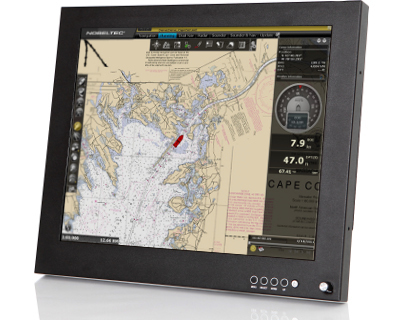
Titan Commercial Grade LED Display

Titan commercial-grade displays are now available at a price that won’t break the bank. Our different sizes and formats of flexible displays combine state-of-the-art features with user-friendliness, such as daylight readable LED backlight technology and multiple inputs. This product is well-designed for today’s professional customers, with several video inputs/outputs, speakers for audio alarms, and a potentiometer for total dimming to black—all housed in sturdy housing.

Displays from the Titan Series have proven reliable for years, inspiring faith in their wide audience; they are also type-approved and ready to be integrated into your IMO bridge systems.

[button link=”https://nauticomp.com/commercial-displays/titan-commercial-grade-led-display/” size=”large” target=”_blank” color=”orange”]Learn More[/button]

Genesis Series DisplaysGenesis Series marine display
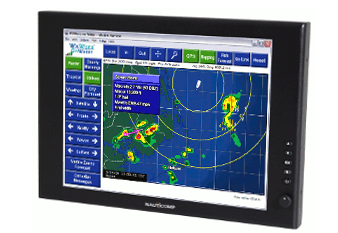
The Genesis series is a cost-effective marine LCD monitor that is waterproof. The 15″ and 19″ monitors include extremely efficient LED backlight technology and 2 inputs (1 DVI and 1 VGA) that combine state-of-the-art hardware with user-friendliness.

With this product, the customer may fit a larger display into a smaller area while still using Nauticomp’s well-known dim-to-red technology and sleek case design.

[button link=”https://nauticomp.com/outdoor-marine-displays/genesis-series-displays/” size=”large” target=”_blank” color=”orange”]Learn More[/button]

Signature II Series DisplaysLED Backlight Technology
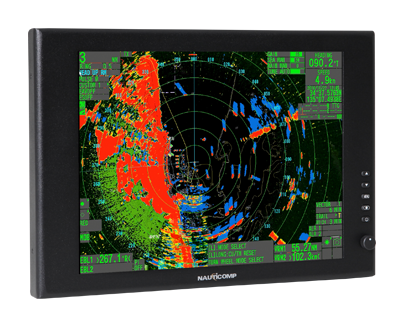
Displays from the Signature II Series are a reliable and cost-effective option for the Navy and the armed forces. The Signature II displays incorporate all the state-of-the-art technology available today, focusing on user-friendliness. This includes the latest in energy-efficient LED backlight technology. This newly redesigned device features our well-known dim-to-red technology on all inputs.

With today’s slimmer case design, users can fit a bigger screen into a smaller area, and a dial lets them adjust the screen’s brightness and contrast on the fly. The Signature II Series’ continued success is mostly because the 15″ and 19″ versions have three inputs: one DVI, one VGA, and one composite.

[button link=”https://nauticomp.com/outdoor-marine-displays/signature-ii-series-displays/” size=”large” target=”_blank” color=”orange”]Learn More[/button]

Nauticomp Passed Ingress Protection (IP) Testing
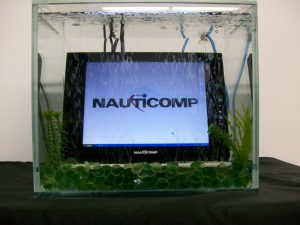
Nauticomp To Demonstrate Marine LED Display Waterproof Test

The degree to which electrical equipment is protected against the intrusion of solids and liquids is known as its ingress protection. There are two numbers for every IP rating. The first value indicates the object’s resistance to penetration by solids, from complete vulnerability to protect against dust particles. The second rating is for how well it holds up against liquids, from completely defenseless to completely impervious.

All Nauticomp displays are built and tested to an ingress protection level (IP) of 67. The 6 means the device is dustproof, while the 7 means it can be submerged in water for one minute at a depth of one meter. The display cases are completely impermeable because of how the aluminum housings are welded together inside.

Nauticomp maritime displays and their associated cables and connectors are built to an IP68 standard, the second number indicating that they can be submerged to a depth of three meters indefinitely.

Rack Mounted Display Installation Process/Guide

  • Attach the four VESA mount PEMS to the back of the screen to create the ‘Ram mount.’
  • Unscrew the massive wing nut and slide the ‘Ram mount’ arm over the pedestal ball to attach it to the bracket.
  • Nauticomp’s power supply requires input voltage wires (1) to be connected to the ship’s power supply (either 12, 24, 36 VDC, or 110 VAC, depending on the order). A positive input terminal is indicated by a red wire, while a black wire indicates a negative terminal. Make sure all connections are snug.
  • Join the screen’s power cable (2) to the wall outlet. Use the positive output terminal for the red wire and the negative terminal for the black wire. Make sure all the plugs are securely tightened.
  • Turn the connector so the LTW logo is not visible in the screen’s field of view. Connectors can be made more secure by pressing in and turning them in a clockwise direction. All the LTW round-ended cables should be treated similarly.
  • To check for a solid connection, gently tug on each cable.

Nauticomp Inc. provides world-class fully customizable touchscreen displays for commercial and industrial settings. With features like sunlight readability, brightness adjustability, infrared lighting, full backlighting, all-weather capabilities, etc., our displays are second to none. Contact us today to learn more.

Optical Bonding Options for Rugged Touchscreen LCD Displays

Posted on: August 10, 2022

Digital SignageTouchscreen displays are becoming more and more common in both personal and business settings. They offer a level of convenience and interactivity that is hard to beat. However, touchscreen displays can be fragile and are susceptible to damage from drops or scratches.

One way to protect against this type of damage is to use an optical bonding process to attach the touchscreen LCD to a protective glass panel. This article will explore the different options for optical bonding and discuss the benefits and drawbacks of each option.

What Is LCD Optical Bonding?

LCD optical bonding is a process in which the LCD and a protective glass panel are bonded together using an optically clear adhesive. This process can be used to protect the LCD display from damage due to drops, scratches, or other types of impacts. 

When a regular display is utilized in an outdoor setting, several variables influence its readability. The most typical is condensation, or fog, which forms on the inner surface of the display’s shield. The reflection of sunlight also plays a factor, often resulting in a mirror image on the display. However, both these problems can be eliminated by using optical bonding.

Types of Optical Bonding

There are a few different types of optical bonding for LCD displays, including:

  • Optical Clear Adhesive (OCA) Lamination:

    Optical clear adhesive is a type of UV-curable glue that is used to bond the LCD and the glass panel together. Once the adhesive cures, it is optically clear and allows light to pass through it without distortion. This type of optical bonding is typically used in displays that will be exposed to harsh environments, as it provides the highest level of protection against damage.

  • Air Gap Bonding:

    The air gap filling or bonding process is accomplished by first cleaning the inside surfaces of the LCD and the glass panel. A UV-curable adhesive is then dispensed onto one of the surfaces, and the two surfaces are brought together. The adhesive is cured using UV light, and the air gap is filled with an optically clear resin. This type of optical bonding provides a medium level of protection against damage.

  • Liquid Optical Bonding:

    The liquid bonding process is similar to the air gap bonding process, but instead of using a UV-curable adhesive, a liquid optically clear adhesive is used. This adhesive is dispensed onto one of the surfaces, and the two surfaces are brought together. The adhesive cures over time, and the liquid optically clear adhesive helps to fill any air gaps. This type of optical bonding provides a lower level of protection against damage, as the liquid adhesive is not as durable as a UV-curable adhesive.

  • Optical Clear Film Lamination:

    Optical clear film lamination is a process in which an optically clear film is used to bond the LCD and the glass panel together. This type of optical bonding provides a medium level of protection against damage, as the optically clear film helps to absorb shock.

  • Liquid Optical Clear Adhesive (LOCA) Bonding:

    The LOCA bonding process is similar to the liquid bonding process, but instead of using a liquid optically clear adhesive, a UV-curable adhesive is used. LOCA is utilized in touch panels and display devices.

  • Dry Optical Bonding:

    Dry Optical Bonding uses heat and pressure to attach the touch panel directly to the LCD. This process makes for a more durable and scratch-resistant product. However, it is important to note that this type of optical bonding can only be done if the materials being bonded have a similar coefficient of thermal expansion.

Which Industries Is Optical Bonding Best Suited?

Optical bonding is suitable for a wide range of industries, including:

Advantages of Optical Bonding for Touchscreen LCD Displays

There are many advantages to using optical bonding, including:

  • Improved durability
  • Improved readability
  • Reduced reflection
  • Reduced condensation
  • Increased sunlight-readable display performance
  • Improved touchscreen sensitivity
  • Protection from environmental damage
  • Increased contrast ratio

Contact Nauticomp to Learn More About Touchscreen LCD Displays

Nauticomp Inc. specializes in the design and manufacture of high-quality, sunlight-readable, fully ruggedized, and waterproof LCD displays, computers, and components for a variety of industries and applications. We offer both standard and custom solutions to meet the specific needs of our customers. Our products are designed to withstand the harshest environments. Contact us today to learn more. 

Everything You Need to Know About ECDIS in the Marine Industry

Posted on: July 13, 2022

marine display

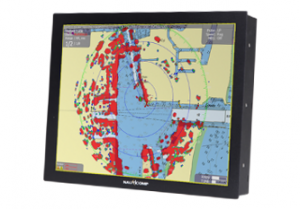
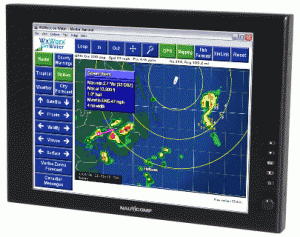
As the marine industry increasingly looks to digitize its operations, one of the most important pieces of technology that vessels are adopting is the electronic chart display and information system, or ECDIS. This system is a type of marine navigation that uses electronic navigational charts to display information about a vessel’s position and the surrounding sea.

If you are working in or supplying products or services to the marine industry, it is important to understand what ECDIS is and how it works. In this blog post, we will provide an overview of ECDIS technology and discuss some of the key considerations when implementing this system on ships.

What Is an Electronic Chart Display and Information System?

As mentioned above, an ECDIS is a maritime navigation device that displays a vessel’s position and the surrounding sea using digital charts. This system is increasingly being used by vessels as the marine industry looks to digitize its operations.

ECDIS is now a mandatory navigation system on ships trading in European waters. This system replaces the traditional paper charts used on board vessels for navigation. ECDIS presents navigational data on a computer screen, allowing officers to navigate more safely and efficiently.

Types of ECDIS

There are two different types of ECDIS available on the market, each with its own advantages and disadvantages. Below we discuss the different options in more detail.

Raster Navigational Charts

Raster navigational charts are digital images of paper charts. These charts are created by scanning a paper chart and converting it into a digital image file. 

The main advantage of raster chart display systems is that they are relatively easy to use and understand. This type of system is also less expensive than vector chart display systems.

The disadvantages of raster charts include the fact that they can be less accurate than vector charts and they can be more difficult to update.

Vector Navigational Charts

Vector navigational charts are created using electronic vector data. This data is more accurate than raster data, making vector chart display systems more precise tools for marine navigation.

The main disadvantage of vector charts is that they can be more expensive than raster charts. Another downside of vector charts is that they can be more difficult to use and understand than raster charts.

Why Use Bigger Marine Monitors for ECDIS?

Marine displays have to meet the strictest standards for quality and durability. That’s why marine LCDs and monitors are designed specifically for use in harsh marine environments.

When it comes to ECDIS, bigger is usually better. A larger marine display will give you a better view of the digital charts and information being displayed. This is especially important when navigating unfamiliar waters.

Some marine displays are even designed to be used in multi-display setups, giving you an even larger view of the navigational data.

Multi-touch marine displays are also becoming more popular, as they offer a more intuitive way to interact with the ECDIS system. Waterproof marine displays are another option to consider, as they can be used in all weather conditions.

Safety Parameters for an ECDIS Marine Displays

There are several safety parameters that should be considered when setting up an ECDIS marine display. These settings include:

  • The safe navigation area
  • The safe distance from land
  • The depth of water
  • The speed of the vessel
  • The type of vessel

Key Considerations for Implementing ECDIS

There are a few key considerations to keep in mind when implementing an ECDIS system on board a vessel.

First, the system must be able to meet the specific navigational needs of the vessel. Second, the system must be easy to use and understand. And third, the system must be able to integrate with other onboard systems.

Some marine displays are designed specifically for use with ECDIS systems. These displays usually have larger screen sizes and higher resolutions, making them ideal for viewing digital charts and navigational data.

What Are the ECDIS Marine Display Requirements?

There are several requirements that must be met in order to use an ECDIS marine display.

  • Must Display SENC Information: The marine display must be able to display System Electronic Navigational Chart information. SENC is the digital chart data that is used by the ECDIS system.
  • Must Be DGNSS Compatible: The marine display must be compatible with Differential GPS (DGNSS) systems.
  • Must Meet IMO Standards: The marine display must meet the standards set by the International Maritime Organization (IMO).
  • Must Be Type-Approved: The marine display must be type-approved by a recognized marine organization. Some marine displays are specifically designed for use with ECDIS systems and have been type-approved by the IMO. Marine displays have to meet the strictest standards for quality and durability.
  • Must Show the Information Scale: The marine display must be able to show the correct scale for the navigational data being displayed.
  • Must Display Screen Specification: The marine display must have a screen that is large enough to show the navigational data being displayed.
  • Must Show Chart Features: The marine display must be able to show all of the features that are required for safe navigation.
  • Must Have Data Overlay: The marine display must be able to overlay the navigational data on top of the chart data.
  • Must Have Symbols, Fonts, and Colours: The marine display must be able to show the required symbols, fonts, and colours.

Contact Nauticomp to Know About the Different Marine Monitors

Vessels of all sizes are increasingly using ECDIS to navigate their way through the water, and as this technology continues to develop, it is important that mariners understand how these systems work.

If you’re looking for more information about electronic chart displays or any other marine monitors, be sure to get in touch with Nauticomp, Inc. We provide world-class fully customizable touchscreen displays for commercial and industrial settings and can help you find the perfect system for your vessel. Contact us today to learn more.

Understanding Weatherproof and Waterproof IP Ratings

Posted on: February 5, 2022

signature II series

Marine displays are frequently thrust into extremely harsh environmental conditions and sometimes dangerous situations. Waterproof displays that are capable of handling virtually any type of natural element have become the standard when it comes to developing state-of-the-art Marines technology. Outdoor weatherproof displays feature standardized IP ratings that indicate their level of ability to withstand exposure to moisture, dust, and dirt.

Born out of necessity for military and marines use, weatherproof display enclosures were once rare technological features. Now, they’re being used for a variety of devices including smartphones and tablets.

What Do IP Codes/Numbers Represent?

IP stands for Ingress Protection or International/Internal Protection mark. This is a standard internationally recognized rating system that indicates the performance of technological protective enclosures. IP ratings signify how effectively certain technological devices are protected against various external elements such as dust, moisture, and dirt.

Once these elements infiltrate the internal mechanisms of electronic devices, they can cause serious damage and render the device ineffectual or damaged beyond repair. The International Electrical Commission dictates the global standard for rating the performance of these protective enclosures. IP ratings consist of two digits that represent different characteristics:

  • The first number indicates the level of solid particle (e.g., dust, dirt, crumbs, etc.) protection the enclosure provides
  • The second number indicates the level of liquid particle (water droplets, water submersion, spilled drink, etc.) protection the enclosure provides

What Is an IP68 Waterproof Display Rating?

An IP68 waterproof rating is the very highest standard for any device. IP68 enclosures offer total protection against the ingress of any type of foreign substances. Six is the top of the scale for protection against solid particle ingress and 8 is the highest level of protection against liquid ingress.

What Is an IP65 and IP53 Rating?

Certain devices can have multiple IP ratings. These ratings indicate that the devices were tested for numerous different types of weather and environmental conditions. Each rating indicates the enclosure’s protective performance in those specific environments. An IP68 rating indicates that a device can handle being submerged in water that’s deeper than one meter.

If a device also has an IP65 rating, this indicates that it can also withstand being sprayed by a liquid or exposed to heavy rain and other wet conditions. An IP53 rating is significantly lower in both regards. These devices are mostly resistant to debris and dust, but they have fairly low resistance to contact with liquid.

What Are Some Applications for IP68 Enclosures?

Since IP68 enclosures are classified as completely waterproof computer monitors, this makes them the ideal choice for virtually any type of extremely demanding outdoor applications.

As a result, Marine and military waterproof LCD monitors are typically required to have a standard IP68 rating to ensure safe and effective operation at all times.

Other uses and applications can include:

  • Devices that are used in areas with high risk of flooding or moisture exposure
  • Water treatment facilities
  • Devices that are primarily for any type of outdoor use

Nauticomp Inc.’s Waterproof and Weatherproof LCD Monitors for the Marine Industry

Nauticomp Inc. is one of the leading suppliers of high-quality, reliable, and durable Marine and military-grade outdoor weatherproof and waterproof displays. We have a range of outdoor weatherproof displays such as the Glass Bridge Elite, the Signature II Series, and the Genesis Series that are always prepared for the task. Contact us today to learn more about our products and how they can enhance your mission.

Where and How Industrial LCD Monitors and Displays Are Used?

Posted on: November 24, 2021

sunlight-readable LCD monitor

The use of digital displays across multichannel networks and industries has exploded over the past few years. From commercial LED displays used in retail environments to industrial LCD monitors used for military and marine operations, the broad spectrum of applications for which digital screens are used is endless. Customized with innovative features such as brightness adjustability and infrared backlighting, these sunlight readable screens are ideal for indoor and outdoor applications in calm and rough conditions. Although it’s impossible to predict what the future holds, one thing is for certain: commercial and industrial displays are only going to improve with time.

Common Uses for Commercial and Industrial LED and LCD Displays

Waterproof LCD displays are available in a variety of configurations and can be used for multipurpose applications consisting of different parameters. Every environment consists of different risks of exposure to which a sunlight readable LCD must be impervious. Only the most advanced engineering and workmanship can guarantee ongoing protection against various environmental factors. Here are some of the most common applications for which commercial and industrial screen monitors are perfectly suited.

Panel Mount Monitors for Security Surveillance

Available in a variety of sizes ranging from 6.5” to 21.5” inches, panel mount monitors are versatile security surveillance systems that can be mounted in virtually any aperture on a wall. They’re equipped with protective tempered glass to protect the internal mechanisms from dust and dirt and are compatible with both resistive and capacitive technology based on your personal preferences. This a waterproof display that offers exceptional surveillance of your home or business with a long lasting backup battery, an integrated bracket, an LCD panel with LED backlighting, and so much more.

Marine Waterproof and Touchscreen Monitors

Marine waterproof LCD monitors demonstrate the ultimate durability and reliability that any technology has to offer. Continuous exposure to harsh environmental conditions such as corrosive seawater, heavy winds, dirt, dust, sand, vibrations from boat movements, and glaringly bright sunlight would prematurely wear out a regular touchscreen monitor. But Marine-grade touchscreens are no ordinary devices. Equipped with advanced features such as infrared lighting, sunlight readability, as well as shock and vibration resistance, these touchscreens have the capacity to withstand virtually any obstacles that they encounter on the job.

Sunlight Readable and Night Vision Industrial Military Monitors

Military monitors are arguably the strongest and most resilient types of industrial displays on the market. A typical day in military life involves a great deal of physical safety risks and that means personnel need equipment they can depend on. That’s why military displays are equipped with advanced Night Vision Imaging Systems (NVIS) to aid in a wide range of military applications at all hours of the day or night.

Telemedicine and Telehealth Monitors

Medical-grade monitors have also made great strides in recent years. As an increasing number of healthcare professionals are conducting patient consultations using virtual platforms, it’s more important than ever for telemedicine and telehealth monitors to consist of high quality sound and visual components.

Nauticomp Inc. has always been at the forefront of producing cutting edge commercial and industrial technology that can be customized for a wide range of applications. With a commitment to providing excellent customer service and high quality devices suitable for many different fields, we’ve managed to build a strong reputation as being one of the leading manufacturers and distributors of advanced touchscreen monitors and displays the world over. Contact us today to learn more.

Benefits of Using Digital Signage in Tradeshows

Posted on: April 18, 2019

Like most paper products, static tradeshow signage is quickly becoming a relic of the past. As more and more companies become more environmentally conscious and work toward reducing their carbon footprint, rugged LCD displays are at the forefront of numerous industries. Tradeshows offer excellent opportunities to showcase what your business has to offer, engage more customers, broadcast your creative marketing prowess, and feature innovative and eye-catching displays.

Digital signage has the capacity to reach a much wider and more diverse audience than static signage and it’s also a lot more versatile. Here are just some of the benefits of using industrial digital displays at your next tradeshow.

Enhance the Look and Functionality of Your Booth

Not all tradeshow booth locations are created equal. But with the right digital displays adorning your booth, you can easily increase your chances of attracting and engaging more people. Interactive displays can effectively bring people to your booth and keep them there.

Even if you’re busy helping other customers, having an interactive display such as an iPad or computer set up can help keep visitors entertained while they wait. On top of that, you can also use this as an excellent opportunity for the people waiting to learn more about your company, products, and services by displaying informative videos, infographics, and even games in your digital advertising.

Dynamic Room Wayfinding Technology

Tradeshows usually have a lot going on. Overstimulation from all the lights, sounds, and imagery can be overwhelming to the senses and make it difficult for people to locate your booth. Setting up a dynamic industrial display is a great way to make your booth stand out from the rest of the hubbub and gain more foot traffic. Use digital signage to promote any special events you have going on throughout the event including product demonstrations, informative seminars, or special appearances by industry leaders.

A Wide Selection of Display Types

Given the fact that your goal is to create an interactive and dynamic display that attracts as many industry professionals and customers as possible to your booth, your display setup should be extraordinary. Come up with different display configuration ideas that you think will speak directly to the types of attendees you’re hoping to attract. From large wall mounted displays to suspending colourful screens in the air, the sky’s the limit in terms of how you can go about accomplishing your advertising goals at a tradeshow. Just make sure you check the guidelines and obtain any necessary permits beforehand.

Display Social Media Feeds in Real-Time

Social media has become the pinnacle of effective online advertising and marketing across a wide range of industries. It’s a great tool to use to engage physical and virtual tradeshow attendees and keep them updated on everything that’s happening throughout the exhibition. Leverage various social media platforms such as Twitter, Facebook, and LinkedIn to showcase online feeds in real-time and create social schedules so that people can keep up with all of the day’s events. This is also a smart way to keep attendees engaged and encourage them to interact with your company online by entering sweepstakes, playing games, and making use of original hashtags.

Engaging Touchscreen Poster Galleries

Touchscreen poster galleries at tradeshows are akin to wayfinding digital maps in shopping malls. They’re basically a digital guide to all of the different events that are going on at the tradeshow. They provide a complete vendor and attractions list, as well as booth numbers and locations throughout the arena.

If you’re worried about the cost of setting up and maintaining these interactive displays, considering how many people will be using them, they’re actually quite affordable and you only need to setup a handful of them throughout the event centre to guarantee their effectiveness.

Also, many of these displays are waterproof, dustproof, durable, and come with sunlight readability and adjustable brightness settings so they can withstand all kinds of environments and usage.

Synchronized Leaderboard Feeds

Help your brand and customers participate in a little friendly competition throughout the tradeshow just to keep things a little interesting. From interactive digital games to group scavenger hunts and other forms of entertainment, the best way to keep track of who’s in the lead in real-time is by setting up a digital leaderboard feed that everyone can use.

While having leaderboard displays set up throughout the event venue is a great way to capture people’s attention, an even better way to keep them engaged throughout the event is to create an app that allows them to track their progress on their phones. That way, they’ll be able to see exactly where they stand compared to their competitors and be more motivated to improve their rankings during the event.

Interactive Tradeshow Floor Plans

Event planners can make great use of interactive tradeshow floor plans. Pretty much every aspect of tradeshows is broadcast online through social media, web sites, and official apps. To make it easier for all attendees to make their way around the event centre, it’s important to make the floor plans available on social media, the event web site, and the app. Displaying interactive tradeshow floor plans is also a great idea because it allows event planners to easily make last-minute changes and keep the digital floor plans updated as well.

Live Audience Feedback

Keynote speakers and presenters can use industrial displays to ask for live audience feedback during their presentations. By asking poll questions, presenting information in person and through online live feeds, not to mention encouraging online and in-person audience interactions, industry leaders now have a greater capacity than ever before to entice larger national and international audiences.

At Nauticomp Inc., technological innovation isn’t just our passion, it’s our specialty. As one of the leading manufacturers of digital displays, we’ve constructed designs that are applicable across a diverse range of industries from military and marine operations to retail environments and so much more. Contact us today to learn how we can help you enhance your tradeshow display and attract more people to your booth.